Brand-Issued Discount Codes
Last updated: June 17, 2026
What Are Brand Discount Codes?
Brand discount codes let you offer your audience real savings on products from brands you're already partnered with on Levanta. Unlike a standard affiliate link, a code gives your followers something tangible: a percentage off or a fixed dollar amount saved at checkout.
Codes give you a powerful tool: a real reason for your audience to buy, and a signal that you have a genuine relationship with the brand.
Shopify / DTC brands only. Custom codes built on Levanta are available for brands running a direct-to-consumer store on Shopify. They are not currently available for Amazon-only partnerships.
Why Use Discount Codes?
Give your audience real value: A discount code turns your recommendation into a deal. Instead of just pointing your audience to a brand, you're giving them a concrete reason to buy, and saving them money in the process. That's a stronger pitch than a link alone.
Strengthen your creator brand: Having a code signals a real, direct relationship with the brand, not just a generic affiliate link. It makes you look like a trusted partner, not just a promoter.
Earn in channels where links don't work: Tracking links are great for blog posts and Instagram stories, but they don't work everywhere. Discount codes can fill that gap. Say it on a podcast, mention it in an in-feed video. You can also use a code alongside a tracking link to cover all your bases.
How It Works
A brand creates a code and assigns it to you. Codes are set up by the brand and tied specifically to you. One creator per code.
You're notified. Your code appears in the Promo Codes tab (Tracking > Promo Codes in your sidebar). In-app notifications are coming soon.
You promote it however it fits your content. Drop it in a caption, say it on a podcast, pin it in your bio, or include it alongside your affiliate link in a story or post.
Finding and Managing Your Codes
Go to Tracking > Promo Codes in your sidebar. Your codes table shows the brand name, the code itself, eligible products (click any thumbnail to see the full list), and the discount type. You can filter by brand, minimum discount percentage, or minimum discount amount, and sort by total uses or total sales.
How Commission Attribution Works
Each brand chooses one of two attribution settings. This is a brand-wide setting, not configured per code or per creator. It only comes into play when two different creators are both connected to the same conversion.
If only one creator is involved in the sale, that creator gets paid, regardless of which setting the brand has chosen.
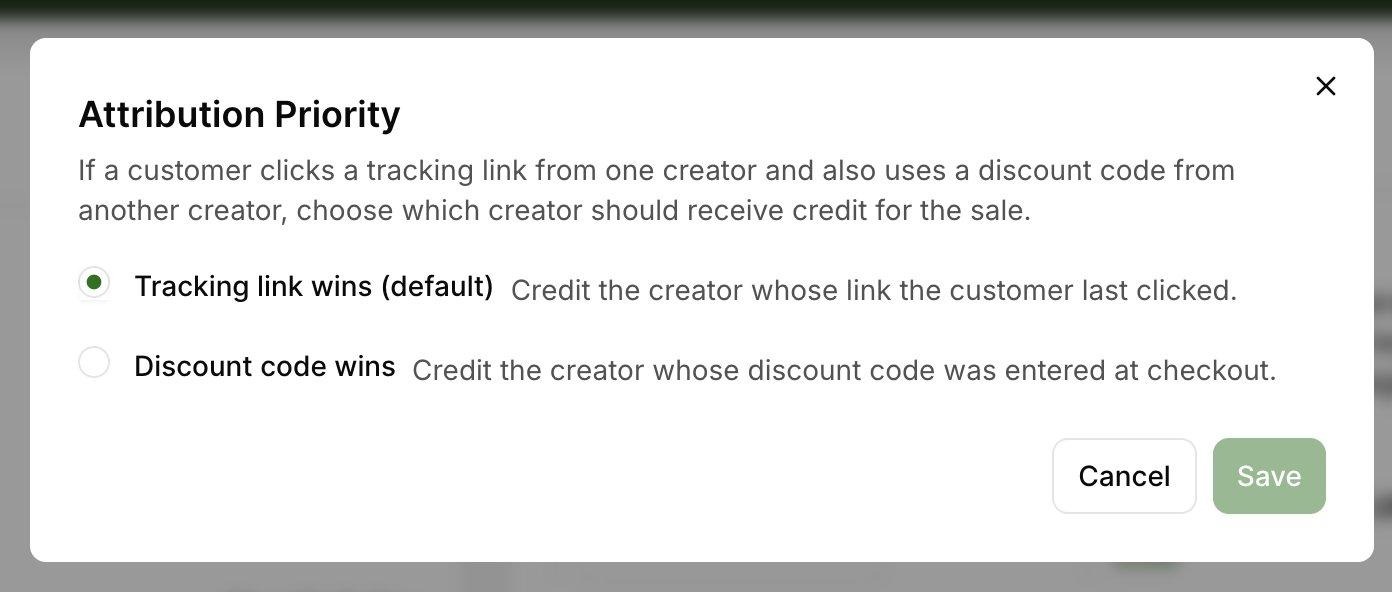
Attribution Priority setting - brands choose this once, and it applies across all creators and codes
Tracking link wins (default): Credit goes to the creator whose link the customer last clicked. If a customer clicks your link and buys, you earn commission whether or not they used a code at checkout. Example: a customer clicks Creator A's link, then enters Creator B's coupon code. Under this setting, Creator A gets the commission.
Discount code wins: Credit goes to the creator whose discount code was entered at checkout. If a customer uses your code, you earn commission even if they did not click your link first. Example: a customer clicks Creator A's link, then enters Creator B's coupon code. Under this setting, Creator B gets the commission.
In short: if only one creator is involved in the sale, that creator gets paid. The attribution setting is brand-wide and only matters when two different creators are both connected to the same conversion - one via a clicked link, the other via a redeemed code.
FAQs
Q: How do I know when I've received a new code?
Check your Promo Codes tab under Tracking in your sidebar. In-app notifications are coming soon.
Q: Can I share my code publicly or with other creators?
Your code is intended for use with your own audience. Sharing it with other creators or posting it in deal-aggregator communities may affect your attribution and could violate your agreement with the brand.
Q: What discount types are supported?
Percentage off or fixed dollar amount, applied to specific products or the full order.
Q: Can I see how many times my code has been used?
Yes, check your Promo Codes table and earnings report for the total number of uses
and sales.
Q: How are earnings reported?
Code-based earnings are shown separately from link-based earnings for clarity.
Q: How do I know which attribution setting a brand is using?
You can see the attribution mode for each of your codes in the Promo Codes table.
Q: What if the seller deletes the code?
The code will no longer show as active in Levanta, and the brand should let you know. We will soon send alerts to notify you that a code was deactivated.
Questions? Reach out to cs@levanta.io for help with codes or earnings tracking.