Levanta's Wayfair Integration for Creators
Last updated: October 5, 2026
Integrating with Levanta's Wayfair Network
This guide walks you through how to:
Claim your CJ publisher account so your Wayfair commissions can be paid out
Retrieve a list of all Wayfair brands or products available in Levanta
Generate affiliate links for each brand or product
Pass in custom tracking parameters
Understand commission structures
Track conversions and performance
What is not part of the Wayfair program at launch: Paid Placements and product sampling. Both are Amazon, Walmart, and Shopify features. Wayfair partnerships are affiliate commission only at launch.
Claim Your CJ Publisher Account
Wayfair commissions are processed through CJ (Commission Junction). Before Levanta can pay out commissions you have earned on Wayfair, you need to verify that you own your CJ publisher account.
This is a one-time setup step, and it is specific to Wayfair. No equivalent step is required for Amazon, Walmart, or Shopify.
Before you start, you will need:
An active CJ publisher account at members.cj.com
Access to CJ's developer portal, using the same CJ login
Step 1: Create a CJ personal access token
Log in to CJ's developer portal with your usual CJ account
Go to Authentication › My Personal Access Tokens
Under Register a New Personal Access Token, enter a Token Name. Something identifiable, such as Levanta, works well. A name is required.
Click REGISTER
Copy the token immediately. CJ displays it only once, and it cannot be retrieved later.
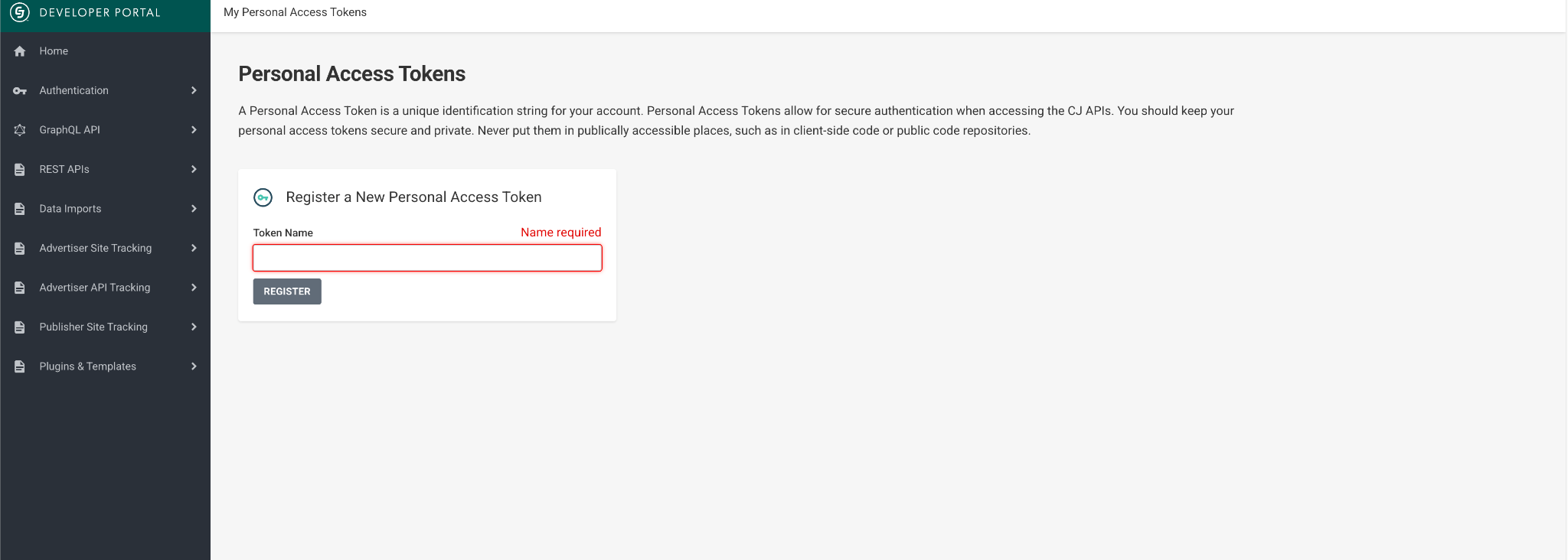
Keep your token private. CJ's guidance is that personal access tokens should never be placed anywhere publicly accessible, such as client-side code or public code repositories. Treat it like a password.
Step 2: Find your CJ company ID (CID)
Go to members.cj.com
Click your company name in the top right
Your CID is shown in the CID column. It is numeric, for example, 7654321.
Step 3: Connect in Levanta
Go to Settings › CJ publisher
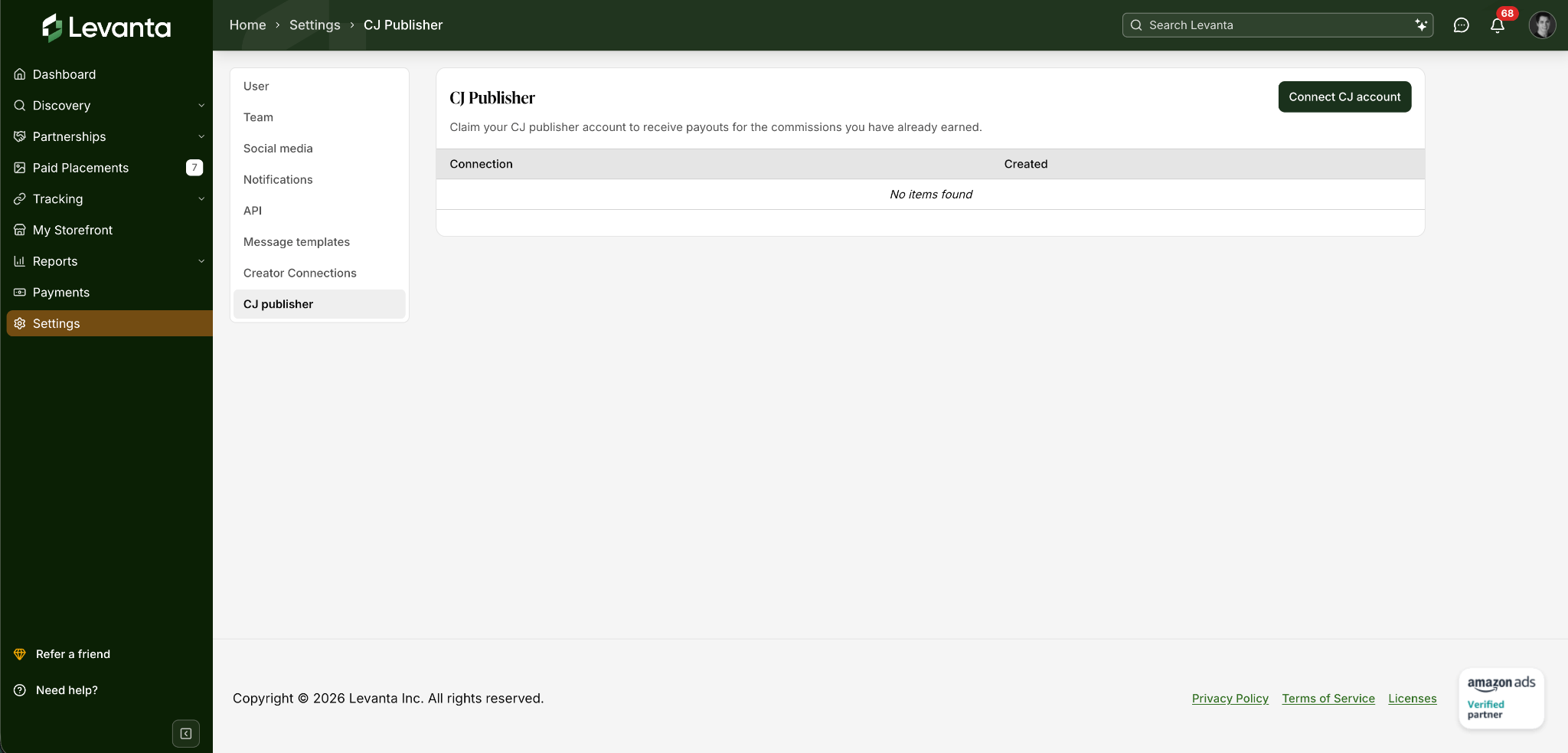
Click Connect CJ account
Paste your CJ personal access token
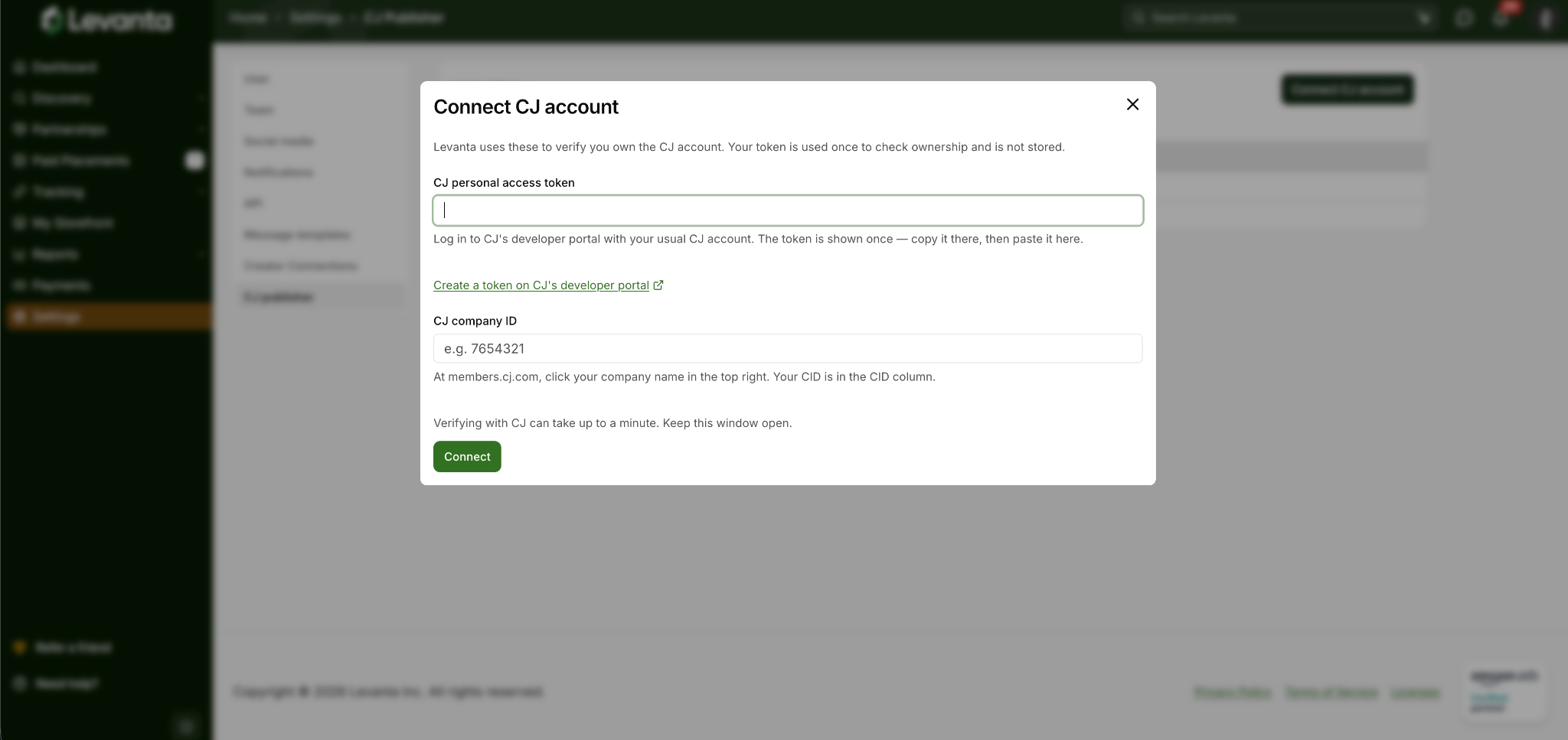
Enter your CJ company ID
Click Connect
Verification with CJ can take up to a minute. Keep the window open while it completes.
Note on your token: Levanta uses the token once, only to confirm that you own the CJ account. It is not stored.
Once verification succeeds, your connection is listed on the CJ publisher page with the date it was created. Before that, the table shows No items found.
Retrieve Wayfair Brands or Products
Levanta supports multiple marketplaces. To work specifically with Wayfair brands, filter by:
Option A: Get Wayfair Brands
Endpoint
GET https://app.levanta.io/api/creator/v2/preview/brands
Docs
https://api-docs.levanta.io/v2/creator/brands/list-brands
Required Filter
marketplace = Wayfair
Use this when you want to:
Show a storefront view of a supplier, including logo and brand bio
Allow users to browse all products from a brand
Option B: Get Wayfair Products
Endpoint
GET https://app.levanta.io/api/creator/v2/preview/products
Docs
https://api-docs.levanta.io/v2/creator/products/list-products
Required Filter
marketplace = Wayfair
Use this when you want to:
Display either a full list of available SKUs or specific SKUs
Show pricing and product-specific data, including product imagery
Create direct product affiliate links
Index approved products by SKU
Note on Product IDs:
Wayfair's primary product identifier - Item ID
Where a creator finds it in a standard Wayfair product URL
Whether it is returned in primaryId in the products response, as with Walmart
Note on Commission Data:
Creators earn supplier-funded commission and Wayfair commission. The conversions API only exposes commissionAmount, which is the seller commission and the Wayfair commission combined. The products API does return marketplaceCommission separately.
The Wayfair base rate is currently set to 5% for conversions from Levanta links. The rate for your CJ links will be dependent on whatever agreement you have with Wayfair through CJ.
For reference, Wayfair suppliers pay no Levanta SaaS fee. The only amount a supplier pays is the commission that goes to affiliates.
Create Affiliate Links
You can generate Wayfair affiliate links in two ways: dynamically by constructing the URL or via the API.
Option A: Create Links Dynamically
Once you have your creatorID, the Wayfair product identifier, and any optional tracking parameters, you can construct affiliate links using Levanta's standard Wayfair link structure.
Product Link
https://lvnta.com/wf/us/{creatorID}/{wayfairItemID}
Product Link with Tracking Parameters
https://lvnta.com/wf/us/{creatorID}/{wayfairItemID}?subid1={x}&subid2={y}&clickid={z}
Key values explained:
Parameter | Description |
creatorID | Your static Levanta creator ID; it does not change per link |
ItemID | The Wayfair product identifier for the specific product |
subid1 | Optional: custom tracking field (e.g. author, distribution channel, domain) |
subid2 | Optional: second custom tracking field for additional granularity |
clickid | Optional: click-level tracking ID. See the note on click data below. |
Option B: Create Links via API
If you prefer not to construct URLs manually, you can generate product links via the API.
Endpoint
POST https://app.levanta.io/api/creator/v2/preview/links
Docs
https://api-docs.levanta.io/v2/creator/links/create-product-link
This endpoint returns a fully formed affiliate link.
Use API link creation when:
You want centralized link management
You prefer backend-controlled link generation
You want to avoid handling link construction logic client-side
Add Custom Tracking Parameters
Levanta supports optional tracking parameters that allow you to pass your own identifiers. These values are returned in conversion reporting.
Supported Parameters
Parameter | Description |
clickid | Click-specific ID for tracking paid traffic at the individual click level |
subid1 | Custom identifier: author, channel, domain, article ID, etc. |
subid2 | Secondary custom identifier for additional granularity |
Common use cases
Pass internal click IDs for paid search or social attribution
Differentiate traffic by placement (homepage, email, article, social channel)
Attribute conversions back to your internal system
Distinguish between publications or domains
Track individual article performance by passing an article ID as subid1
Highly recommended if you run paid traffic, distribute content across multiple channels or domains, or operate at scale.
Important: Missing Click Data for Wayfair
Wayfair conversions reach Levanta through CJ, and CJ does not pass click-level data to Levanta. This means:
No click counts, click-through rates, or click-to-conversion rates appear for Wayfair links created through CJ in Levanta reporting
Conversions, commission amounts, and order status are reported as normal
If you track click volume in your own performance reporting, you will need to measure it on your own side before the user leaves your property
This is a limitation of the CJ data feed, not of your account setup. Nothing is misconfigured if your Wayfair click figures are empty.
For comparison: Walmart has no minimum click threshold and reports clicks in full. Amazon Attribution requires 10 clicks per link before unlocking conversion data.
Understand Payment Terms
Wayfair commissions are paid out through your claimed CJ publisher account, which is why the connection step above is required before any payout can be issued.
Wayfair: net-30 terms with a 60-day locking period, paid 90 days after the month in which the sale was generated. No minimum traffic or performance requirements.
Track Conversions & Performance
You can retrieve all Wayfair conversions through the same conversions endpoint used across all Levanta marketplaces, filtered by marketplace.
Conversions Endpoint
GET /v2/preview/reports/conversions
Docs
https://api-docs.levanta.io/v2/creator/reports/list-conversions
Available data includes:
Order status (pending, approved, rejected)
Commission amounts
Associated clickid and subid values, where supported
Brand and product data
Conversion timestamps
Not available for Wayfair: click counts and any click-derived metric. See the section above.
Use this endpoint to:
Reconcile commissions
Build internal dashboards
Attribute revenue back to traffic sources
Monitor approval and rejection rates
Automate reporting
End-to-End Integration Flow
Claim your CJ publisher account (Settings › CJ publisher) so commissions can be paid out
Retrieve Wayfair brands or products (marketplace = Wayfair)
Index products by their Wayfair product identifier
Generate affiliate links, dynamic or API
Append tracking parameters, where supported
Use the conversions endpoint to monitor performance and reconcile commissions
Key Differences vs. Amazon Attribution
Wayfair (Levanta) | Amazon Attribution | |
Conversions delivered via | CJ (Commission Junction) | Amazon Attribution |
Account claim required | Yes, CJ publisher account | No |
Click data | Not available; CJ does not provide it | Available after 10 clicks per link |
Product identifier | Item ID | ASIN |
Link parameters | Transparent, human-readable | Encoded, not human-readable |
Storefront/brand links | Not available | Supported |
Commission breakdown | Seller + Wayfair | Seller only (CC links earn on Associates' as well) |
Sub-ID fields | SourceID and sub-source (must be encoded into the link) | SourceID and sub-source (must be encoded into the link) |
Paid Placements | Not available at launch | Available |
Product sampling | Not available at launch | Available |
Full API reference: https://api-docs.levanta.io/v2/creator/reports/list-conversions
Questions? Reach out via the Levanta Slack community or contact support at cs@levanta.io.