Amazon Attribution Integration
Last updated: February 5, 2026
Amazon Attribution Integration: Troubleshooting & FAQ
If you're experiencing issues connecting your Amazon Seller Central account or accessing attribution data in Levanta, this guide walks you through common troubleshooting steps and how to resolve them.
Why Can’t I Connect My Seller Central Account?
Make sure of the following:
✅ You're using the correct email address associated with the Seller Central account you intend to connect.
✅ You are the primary (top-level) user on the Seller Central account.
✅ If you are a secondary user, confirm you have been granted the correct permissions (see instructions below).
✅ Your brand is Brand Registered and has access to Amazon Attribution.
Why Does Levanta Show “Brand Does Not Have Attribution Access”?
If you're seeing the error message "Brand does not have Amazon Attribution access" in Levanta, it means your Amazon Seller Central account is either not fully set up with the required permissions, or there's an issue with your brand’s enrollment in Amazon Attribution.
How to Fix the “Attribution Access” Error:
Contact Amazon Seller Support
Ask to enable Amazon Attribution API access for your brand.
Mention that you are trying to integrate with a third-party partner (Levanta) that relies on Attribution data.
For additional support, please contact ads-api-support@amazon.com
Verify Brand Registry Enrollment
Confirm that your brand is enrolled in Brand Registry and that your Seller Central account is correctly associated with the brand.
Allow for Sync Time
If you've recently updated settings, gained permissions, or enrolled in Attribution, please allow 24–48 hours for the data to sync with Levanta.
📝 Note: Levanta cannot modify your Amazon settings directly. All permission updates must be handled through your Amazon Seller Central account or with assistance from Amazon Seller Support.
How Do Secondary Users Gain Access to Brand Referral Bonus or Reporting?
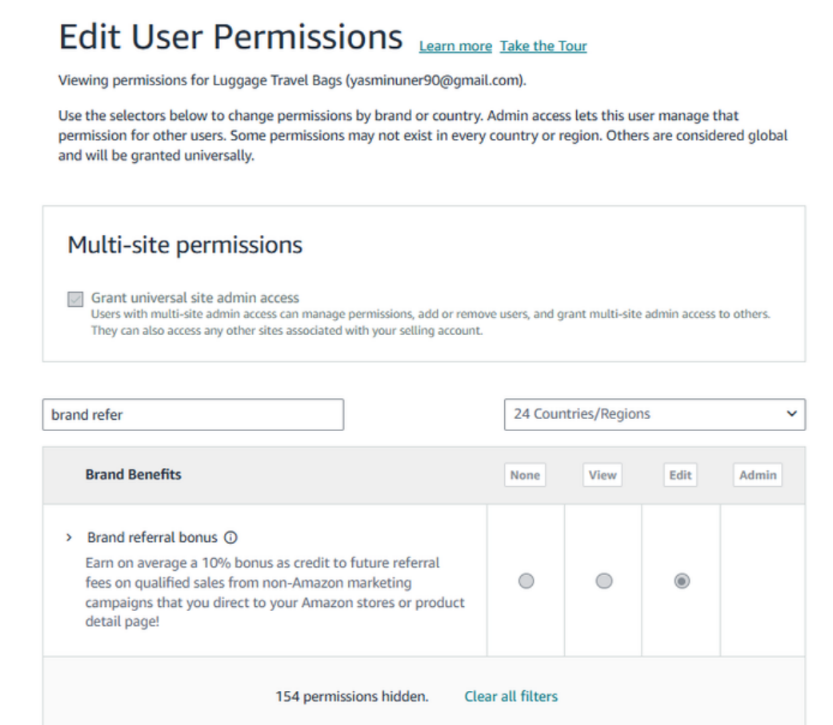
Secondary users can only access Brand Referral Bonus (BRB) enrollment or reports if the primary user grants them permission. This process must be completed within Amazon Seller Central, not in Levanta.
To grant access in Seller Central
Log into Seller Central using the primary user account.
Go to Settings → User Permissions → Manage Permissions.
Scroll down to the Performance section.
Under Brand Referral Bonus, choose:
View – to allow downloading reports.
View & Edit – to allow enrolling in BRB.
📝 Note: Without these permissions, secondary users will not be able to access or manage Brand Referral Bonus functionality.
Questions or Need Help?
Our team is here to support you! Reach out to your dedicated CSM or email us at cs@levanta.io