Creating and Managing Deals on Levanta
Last updated: September 9, 2026
How to Create Deals in Levanta
In this guide, you’ll learn how to create and manage product deals on Levanta either manually or through a CSV upload. These deals help you highlight promotional pricing for Creators and boost engagement.
Getting Started
Levanta allows Sellers to showcase current and upcoming deals directly in the Creator-facing product catalog.
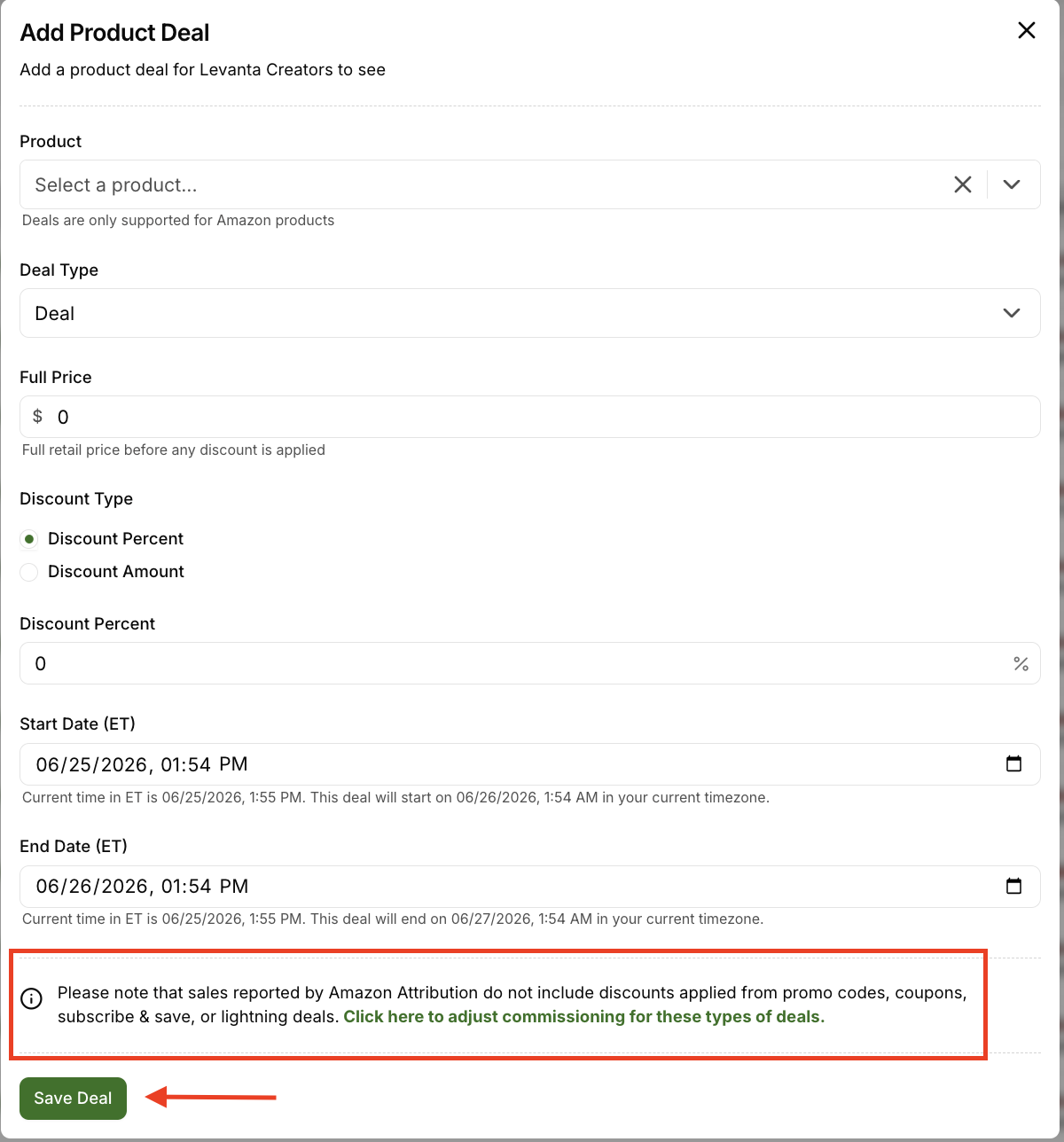
To create a new deal:
Go to Products → Deals
Click Add Deal
Select a product from your imported ASINs
Fill out the required fields and click save:
Product
Deal Type
Full Price
Discount Percent
Start Date (PT)
End Date (PT)
Once saved, the deal will be visible to Creators and labeled as either “current” or “upcoming” in their Product Catalog.
Deal Types Explained
When creating a deal, you'll choose a Deal Type from the dropdown. Here's how each one works:
Deal
A straightforward price markdown applied directly to the product listing — this covers Lightning Deals, Prime Day Deals, Limited-Time Deals, and other discounted pricing. The reduced price shows up directly on the product page, so no action is required from the shopper to unlock it.
Clippable Coupon
A coupon shoppers must "clip" (click the Coupon button) on the product page before the discount applies. Once clipped, the discount is applied automatically when the product is added to cart.
Promo Code
A unique code (e.g., SUMMER2030) that shoppers manually enter at checkout to receive the discount. This is useful for tracking specific promotions or giving exclusive codes to select creators or campaigns
Upload Deals via CSV
If you’re adding multiple deals at once:
Go to Products → Deals
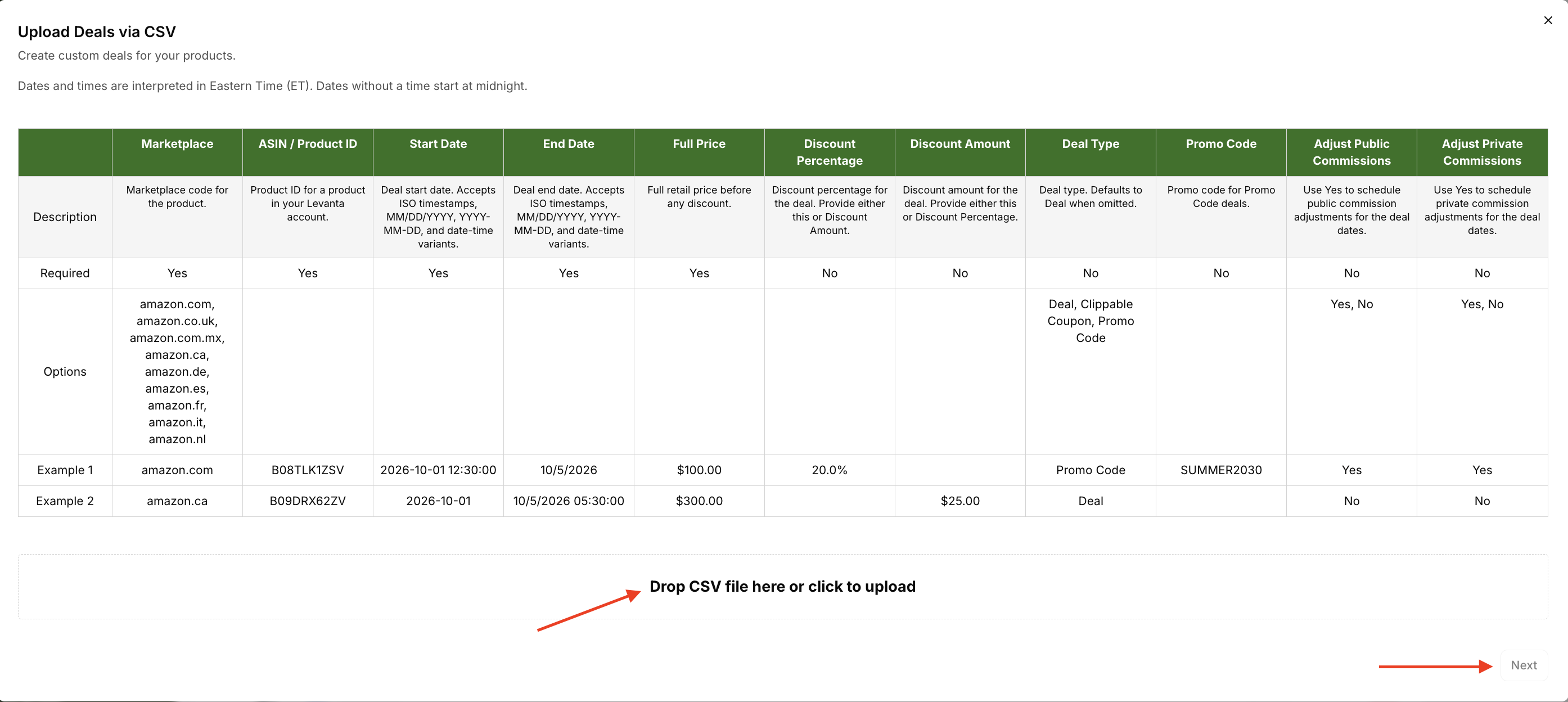
Click Upload Deals via CSV (upper right corner)
Follow the step-by-step instructions to format and upload your file
Tip: Double-check that the dates and discount fields are properly formatted to avoid upload errors.
Start Date with the start time: Example: 10/1/2025 12:30:00
End Date with the end time: Example: 10/5/2025 18:00:00
Notes:
The start and end date need to have the seconds included
Anything that is not a coupon or promo code should be listed as Deal for the deal type
You can use this template for your CSV uploads:
Adjust Private Commissions: Yes or No
How Are Deals Reflected in Commission?
Commissions are calculated based on the “Sale Price” reported by Amazon Attribution.
Discounted, Prime Day, and Limited-Time Deals: These do reflect the deal-adjusted price in attribution reports so commissions are based on what the customer actually paid.
Lightning Deals, Coupons, Promo Codes, and Subscribe & Save: These do not reflect the adjusted price. In these cases, commissions are calculated based on the regular product price. Also, we cannot adjust commissions or create deals for Subscribe and Save.
📌 Learn how to adjust product commissions here.
Adjusting Commissions for Deals
Amazon's reported sales amount doesn't always reflect the discounted price a customer actually paid. For certain deal types, Amazon may still report the product's original price to Levanta even when the customer used a discount.
If Adjust Commissions isn't enabled, creator commissions may be calculated based on that original price. Enabling Adjust Commissions has Levanta automatically schedule a commission rate adjustment for the deal period based on the full price and discount you enter, so the final creator commission matches what the customer actually paid.
When to Enable Adjust Commissions
Turn this on for:
Lightning Deals
Coupons
Promo Codes
These deal types' discounted prices aren't always reflected in Amazon's attribution reports, so enabling Adjust Commissions keeps creator commissions from being calculated on the full price.
You typically don't need it for:
Discounted Deals
Prime Day Deals
Limited-Time Deals
Amazon usually reports the correct discounted price for these, so commissions are already calculated based on what the customer paid.
💡 Note: Subscribe & Save doesn't currently support Deals or Adjust Commissions.
How to Turn It On
When uploading a Deals CSV or creating a deal manually:
Set Adjust Public Commissions to Yes, or
Set Adjust Private Commissions to Yes
Levanta will automatically schedule the applicable commission rate adjustment for the deal period based on the discount you provide.
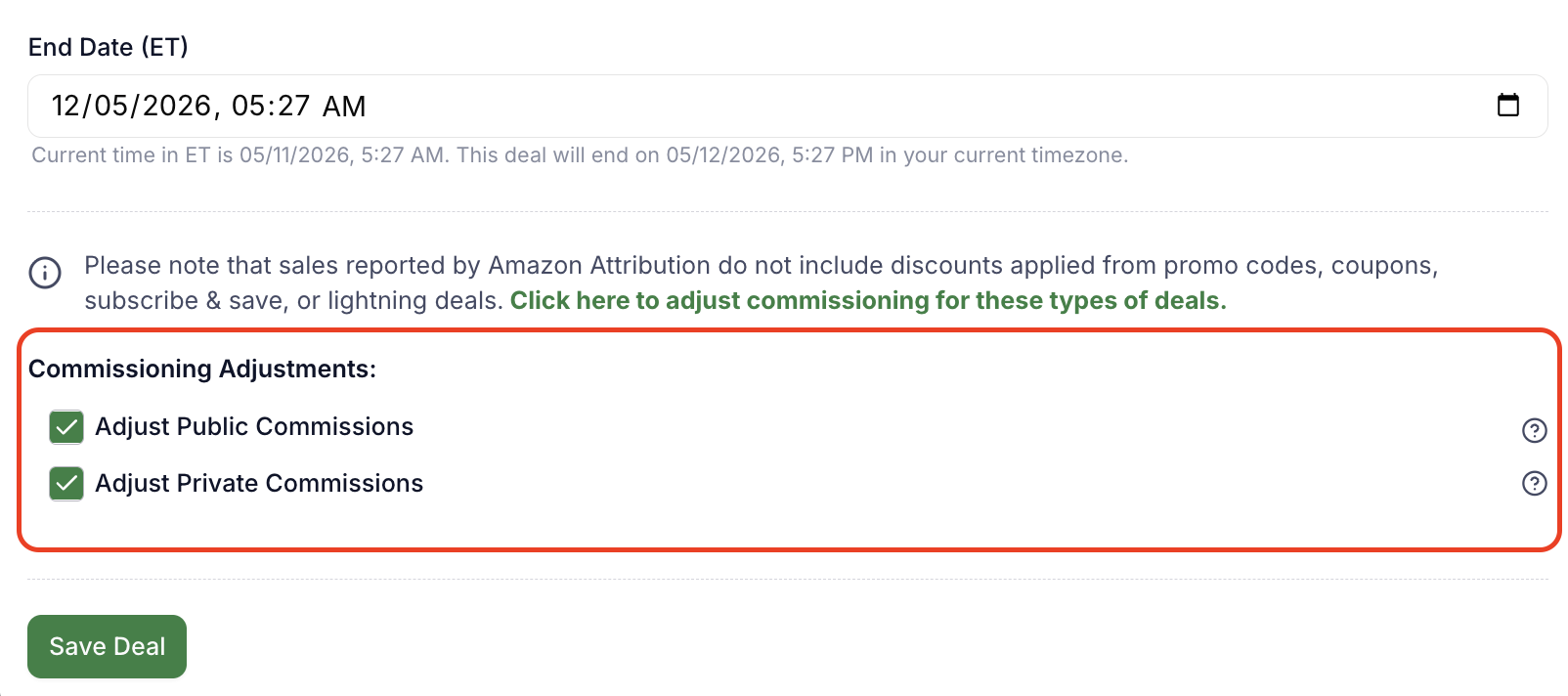
Above: Clicking “adjust commissioning for these types of deals” in the deal form reveals the Adjust Public/Private Commissions checkboxes.
What Happens When You Enable It
Levanta schedules a new, lower commission rate for the duration of the deal. Even though Amazon may still report the original price, the adjusted rate ensures the final creator commission matches the discounted price.
Example:
Full price: $100
Discounted price: $50
Original commission rate: 10%
Without Adjust Commissions:
$100 × 10% = $10 creator commission
With Adjust Commissions enabled, Levanta lowers the rate to 5% for the deal period:
$100 × 5% = $5 creator commission
That matches what you'd get calculating from the discounted price directly:
$50 × 10% = $5 creator commission
So you may see the commission rate drop from 10% to 5% during the deal. This isn't a cut to what creators earn — it's how Levanta keeps the final commission amount aligned with the discounted price, even when Amazon reports the full price.

Above: A scheduled commission change, shown as it appears in the product notification bar.
After the Deal Ends
Commissions revert to your previously scheduled settings. You can view scheduled commission adjustments on the product page.
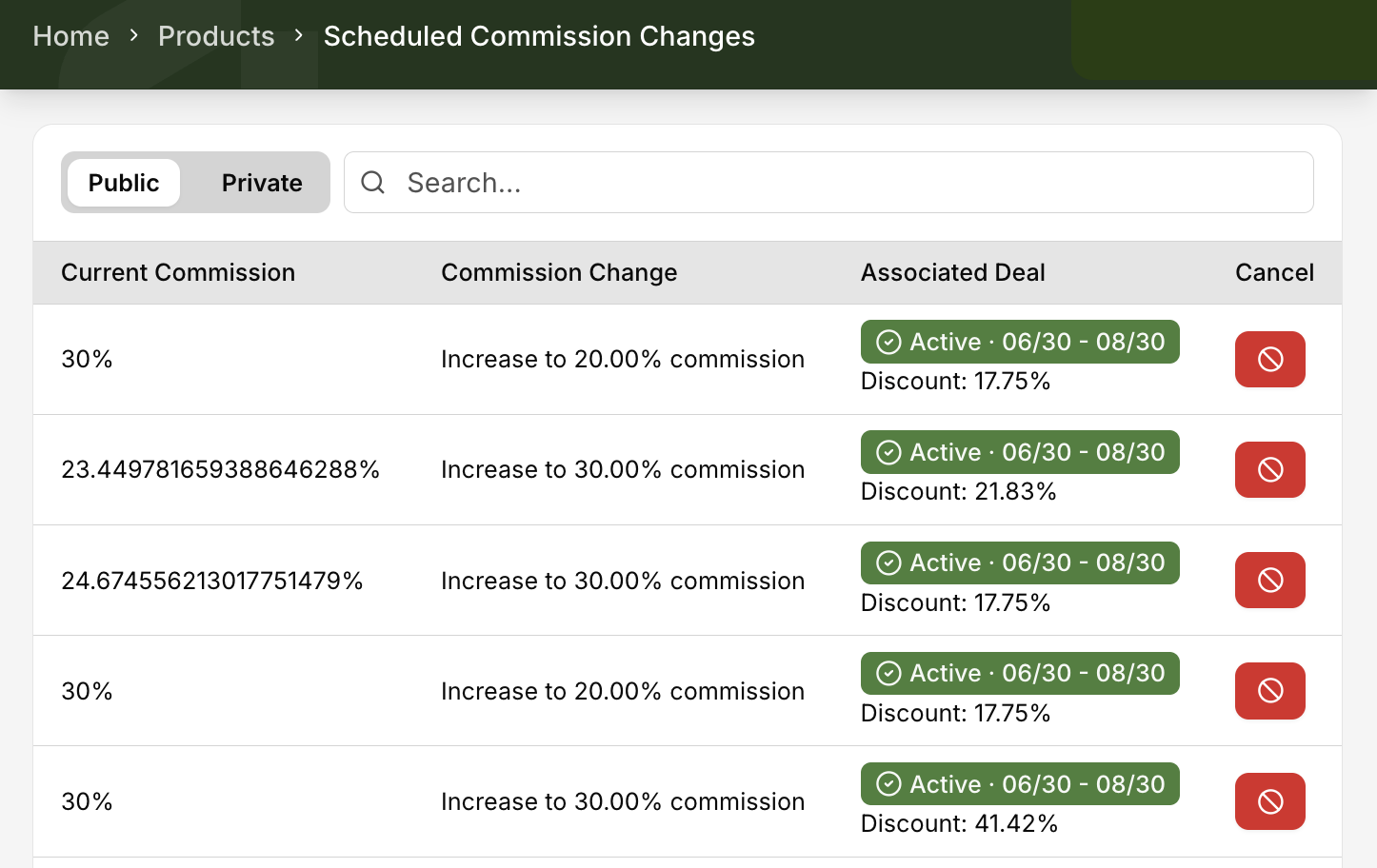
Above: The Scheduled Commission Changes page, showing current commission, the scheduled change, and the associated deal.
Important Note:
Adjust Commissions only changes the creator commission rate and final commission amount during the deal period. It doesn't change the sale price reported by Amazon Attribution, so Sales or GMV in your Levanta dashboard may still reflect the full price. The platform's variable rate fee also continues to be calculated based on the GMV Amazon reports.
Need a Walkthrough?
Watch our quick video guide on how to create deals step-by-step.
Questions or Need Help?
Our team is here to support you! Reach out to your dedicated CSM or email us at cs@levanta.io