Your Levanta Onboarding Checklist: A Step-by-Step Setup Guide for Sellers
Last updated: October 14, 2026
Getting Started on Levanta: Complete Seller Onboarding Guide
This guide walks you through every step of setting up and launching your affiliate program on Levanta — from creating your account to recruiting creators, running campaigns, and optimizing performance. Follow each phase to ensure a smooth and successful launch.
Phase 1: Account Registration & Team Setup
Before doing anything else, get your account and billing in place.
Sign up for a Levanta account at app.levanta.io
Add a payment method via Stripe under your account billing settings
Choose your preferred payment method type (credit card, bank transfer, etc.)
Enable Auto-Billing (optional but recommended) to avoid any interruptions to your program
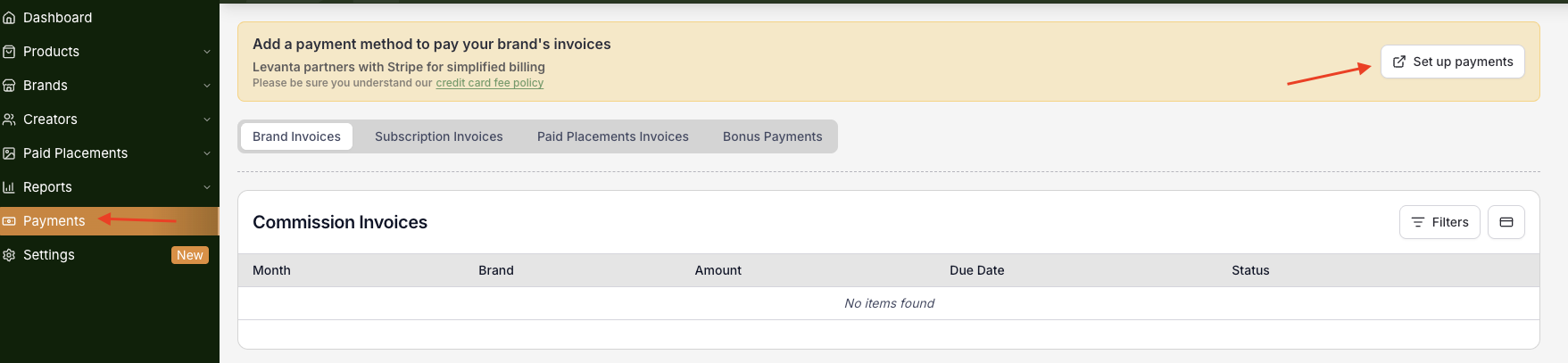
Note: Wayfair suppliers do not pay a Levanta SaaS fee, and there is no Stripe SaaS charge for Wayfair. Adding Wayfair is free and is not a Gold or plan upgrade. The only amount you pay is the commission that goes to your affiliates.
Phase 2: Amazon, Walmart, Shopify & Wayfair Integration
Amazon
Connecting your Amazon accounts is essential for tracking sales and enabling key platform features.
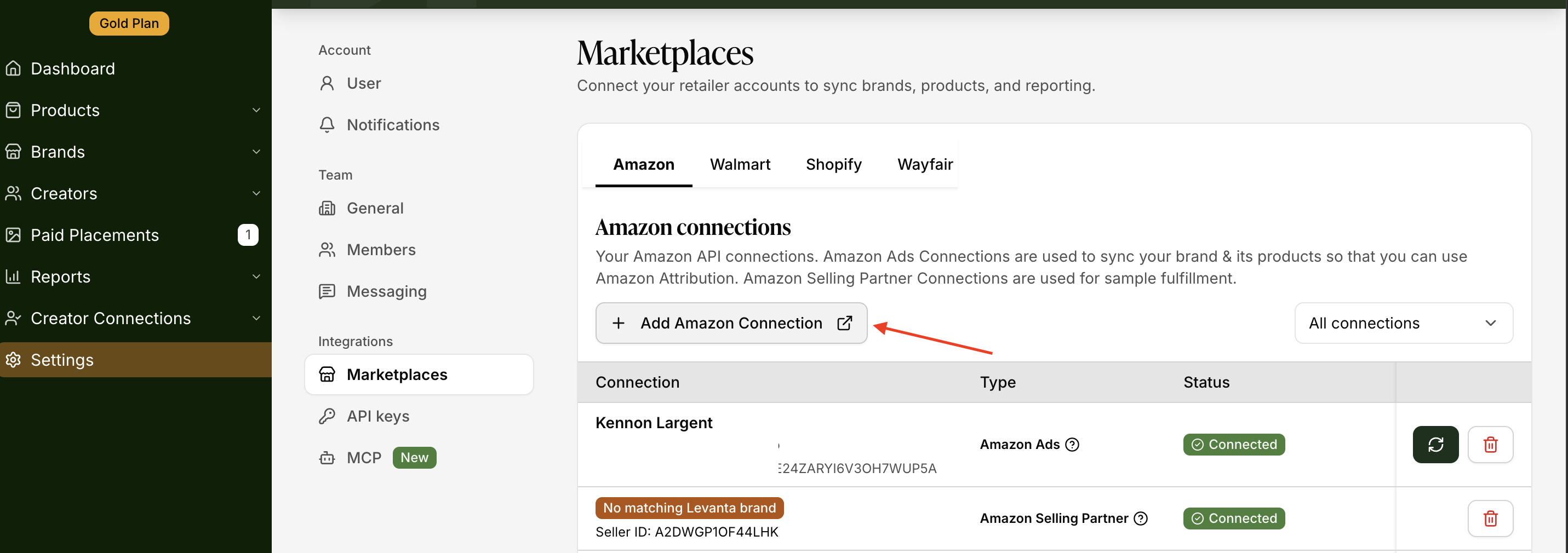
Connect your Amazon Ads account to enable Amazon Attribution tracking — this is required for clicks and conversions to appear in Levanta
Add your Amazon Selling Partner (SP) connection if you plan to use product sampling (Seller Central → Settings → Connections → last option)
Note: The Amazon Selling Partner connection is required to send product samples through Levanta.
Walmart
Go to Settings → Connections → Walmart.
Click + Add Walmart Connection and follow the on-screen instructions to authorize and connect your Walmart Marketplace or Supplier account.
If you are on the Launch Plan or need Walmart functionality enabled on the backend, contact your Customer Success Manager (CSM) or email cs@levanta.io to complete the setup.
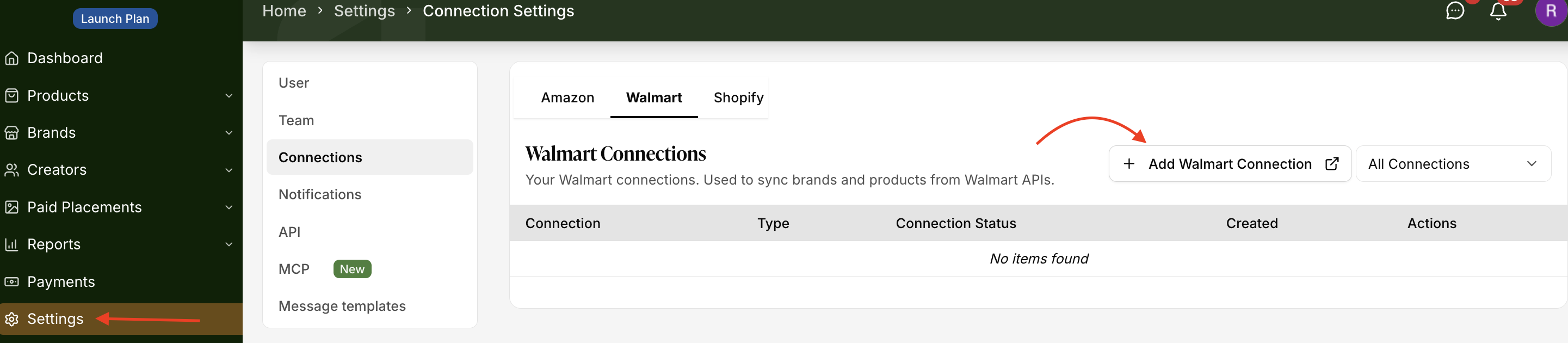
⚠ Note: Connecting Walmart lets you view Walmart performance alongside Amazon and Shopify in one dashboard.
Shopify
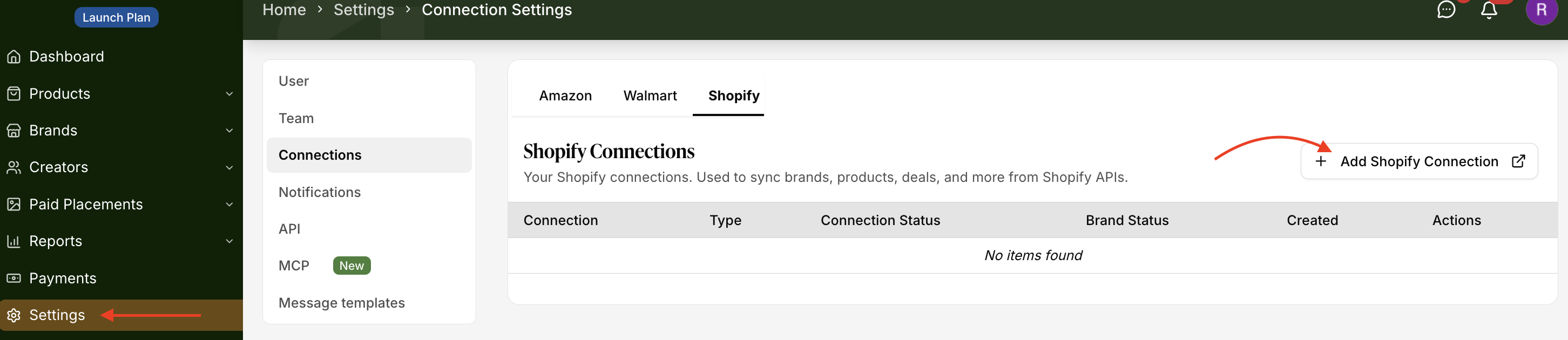
Navigate to Settings → Connections → Shopify tab
Click + Add Shopify Connection — this redirects you to the Levanta app in the Shopify App Store
Log in to your Shopify account and click Install to complete the connection
Wayfair
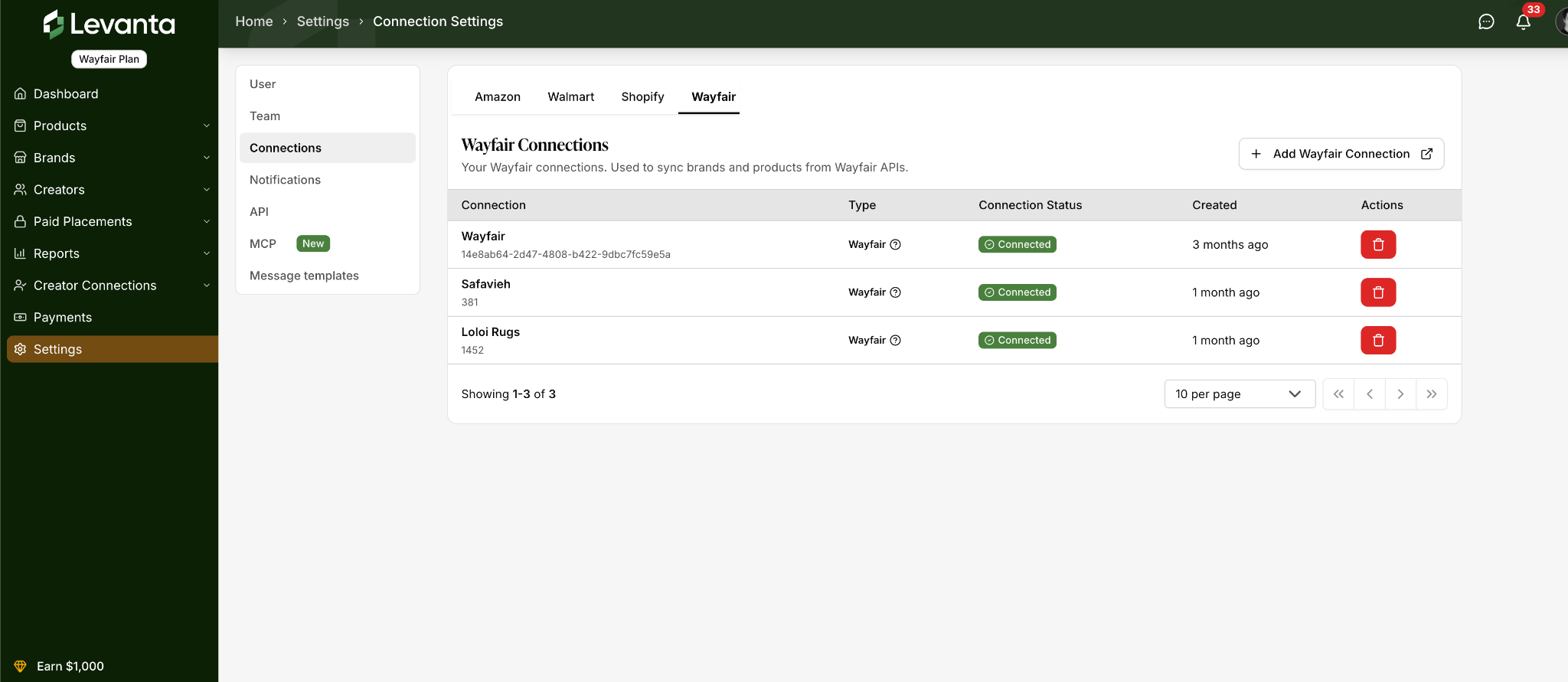
Adding Wayfair is free. There is no additional Levanta SaaS fee and no Gold or Enterprise upgrade required.
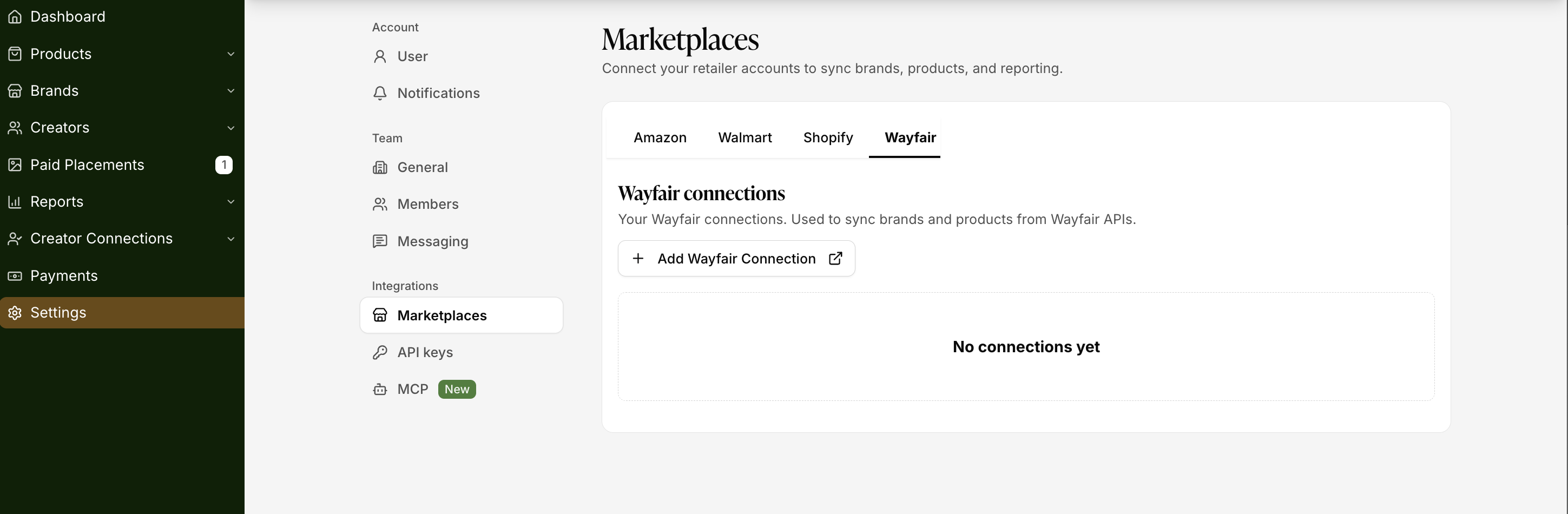
Navigate to Settings → Connections → Add Wayfair to connect your Wayfair account
Phase 3: Brand Profile & Asset Setup
Your brand profile is the first thing creators see when they discover your program. A complete, well-presented profile builds trust and increases your acceptance rate among quality creators.
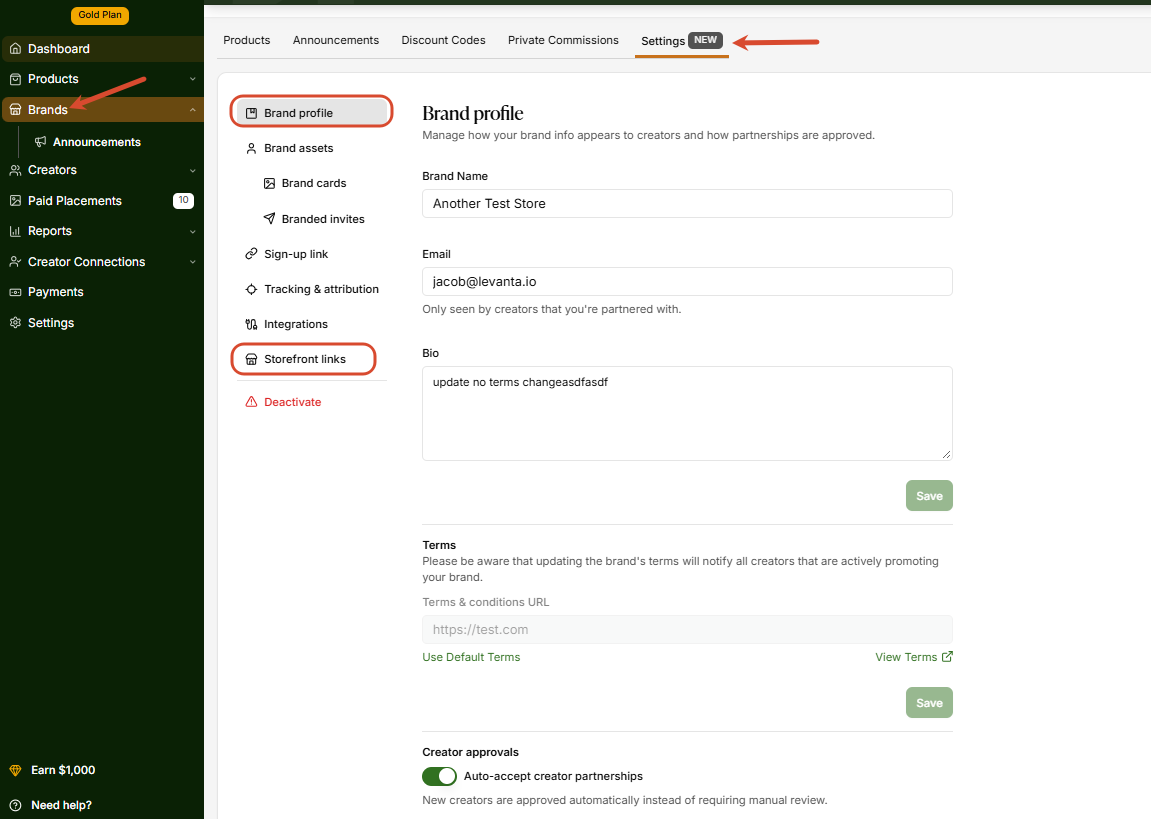
Complete your Brand Page by filling in the following — all of this is visible to creators in the Levanta marketplace:
Brand bio
Brand Name
Amazon Storefront URL
Email
Terms
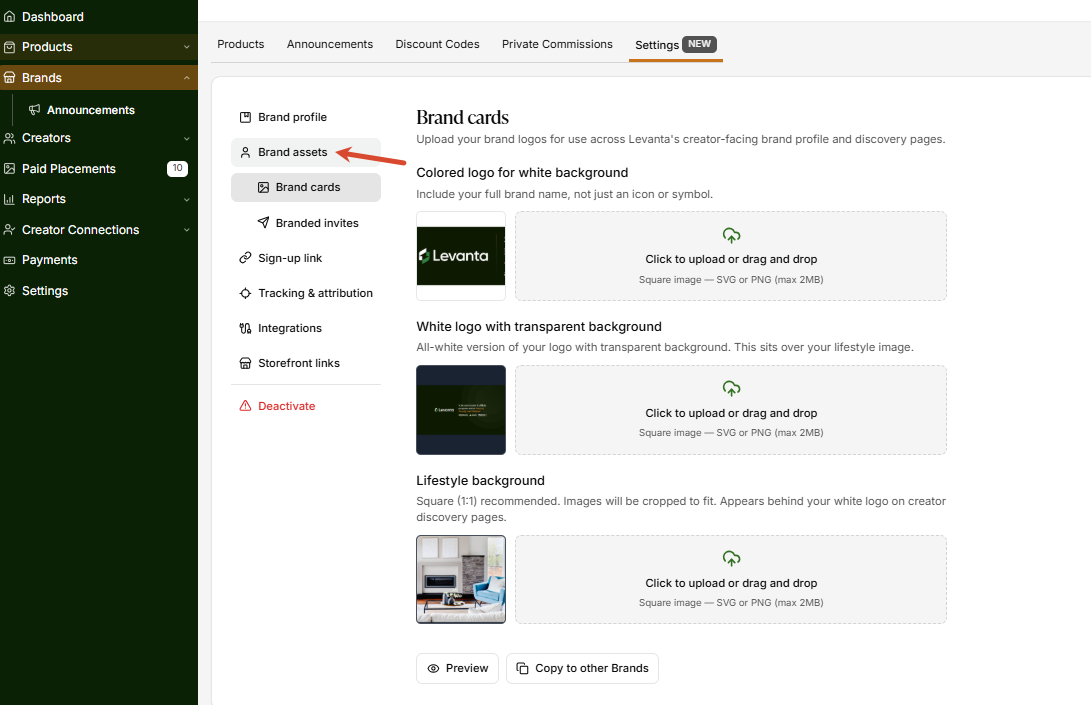
Upload your Brand Assets using the new Brand Assets feature. Click the Brand Assets button on your Brand Profile card to open the asset management drawer. Here you can upload:
Logo file (colored, for white background) — Used across Levanta's creator-facing pages and discovery experiences. Upload as a square SVG or PNG (max 2MB)
Logo file (white, for dark background) — Used on dark backgrounds. PNG with transparency is preferred. Upload as a square SVG or PNG (max 2MB)
Lifestyle watermark file — An SVG or PNG that appears as a watermark behind your white logo on creator discovery pages
Once uploaded, use the Copy to other Brands option to apply the same assets across multiple brands instantly — a major time-saver if you manage several brands under one account.
Note: Brand assets are used to power featured brand placements in Levanta's creator discovery experience and branded creator sign-up flows. Keeping these up to date improves your brand's visibility in the marketplace.
Phase 4: Product Catalog & Commission Setup
Activate your brand and configure the commission structure that will attract the right creators.
Activate your brand — Navigate to Brands → select your brand → Activate, review the terms, and acknowledge the geo notice
Enable auto-accept for creator applications (recommended) — this removes friction and helps you grow your creator base faster
Set your public commission rate — the Levanta platform average is ~20%
Set a private commission rate for high-value creators — the platform average is ~25%
Activate your products so creators can generate attribution links and start promoting
Note: A private commission can also be attached to a message automation as an offer (see Phase 6).
Wayfair suppliers: additional commission rate guidance
Confirm your margin can absorb the commission before setting a rate — your CSM can help you model this.
Higher AOV products can support higher commissions and still attract creators, since a smaller percentage still nets a meaningful payout.
You only pay commission on realized sales — not clicks or views.
New-to-brand (NTB) customers average 85–90% on Levanta across Amazon, Shopify, and Walmart, and often return to purchase outside the affiliate channel, driving higher ROAS.
Consider flexing your rate up around Way Day, Black Friday/Cyber Monday, and category-specific seasonal peaks, when creator competition for attention is highest.
Start with one competitive public rate for broad reach, then layer in private commissions for top performers.
Most suppliers start with a single bulk rate and refine by product/category once they have data. Avoid starting high and lowering later.
You only pay commission on realized sales, not clicks or views. There is no additional Levanta SaaS fee for Wayfair.
Phase 5: Creator Recruitment
With your program ready, build your creator network.
Browse the Creator Directory to discover creators relevant to your niche and audience
Send bulk partnership invites — go to Directory → select creators → Bulk Actions → Send Partnership Invites. Always include a personalized message to improve your acceptance rate
Set up Creator Groups to segment your partners by type (e.g., deal sites, publishers, social influencers) for easier management and targeted outreach
Share your Branded Creator Sign-Up Page — find it under Creators → Applications → Branded Creator Sign-Up Page. Share this link so creators can join your program directly and quickly
Wayfair suppliers: recruitment tips
Invite Wayfair's recommended creators and publishers — Wayfair and Levanta have pre-built recommended affiliate groupings by category, so you can bulk-invite a curated, historically strong-performing list instead of starting from zero.
Lead with your strongest pitch: format invite messages as "Commission % | Biggest USP". This is the single biggest driver of whether a creator opens and responds.
Invite your own talent: bring creators/influencers you already work with into your program directly so their content is tracked and paid through the platform.
Leverage your network: if you work with agencies, media partners, or other brands, see if they have existing relationships with creators on your list — a warm introduction converts better than a cold invite.
Phase 6: Creator Activation & Communication
Getting creators approved is just the start — activation comes from consistent, timely communication.
Review and approve creator applications daily if auto-accept is not enabled
Send a welcome message to every newly approved creator via the Messaging tool. Include your top products, commission rate, attribution window, media kit link, and a point of contact
Prefer not to send these one by one? Go to Settings → Messaging → Automation to automatically send a message template whenever a partnership is formed. Attach a Sampling Suite or a private commission to each automation. See Getting Started with Creators for setup steps.
Publish Brand Announcements to keep all partnered creators informed — navigate to Brands → Announcements → Create Announcement (max 2 per 7 days)
Export your active creator list for off-platform email outreach if needed — go to Creators → Active → Export CSV. The export includes creator email addresses
Review and set private commissions for your highest-value creators to give them an added incentive to prioritize your brand. These can also be attached to message automations to welcome new creators automatically.
Phase 7: Campaigns & Promotions
Drive additional performance through strategic campaigns and placements.
Deals — Upload deals ahead of upcoming promotions by navigating to Brands → Deals → Create Deal. Schedule deals 4–6 weeks before peak seasons. Note that creators are not automatically notified when a deal is published — pair deal uploads with an Announcement or direct message.
CPC Campaigns — Consider launching a Cost-Per-Click (CPC) campaign, especially when entering new product categories, to drive early traffic and visibility.
Creator Connections (CC) Integration — Connect your Creator Connections integration to unlock Levanta's CC-specific features (refer to your CSM for current setup steps). Once connected: create your first CC campaign via CC tab → Campaigns → Create, and set up the Loyalty Bonus Program (LBP) via CC tab → Loyalty Bonus.
Paid Placements — Paid Placements are available for Amazon, Walmart, and Shopify. Consider Paid Placements to secure guaranteed content from top creators: browse creator Rate Cards and send a placement proposal, negotiate the price and finalize terms, then a contract auto-generates and payment is held in escrow until content is submitted.
Note: Paid Placements are not part of the Wayfair program at launch. Wayfair partnerships are affiliate commission only.
Important: For any Paid Placement deal, always ask the creator to include your Levanta attribution link in their content — this ensures the placement also drives tracked sales conversions.
Wayfair suppliers: running promotions
This maps directly onto Wayfair's own sales calendar (Way Day, seasonal moments, category clearance events) — timely, well-communicated deals are one of the highest-leverage tools for driving creator activation.
Announce twice: use Announcements when the deal is first planned, then send a reminder right before it goes live — that second nudge meaningfully improves content creation timing.
Adjust commissions where needed for margin.
Phase 8: Additional Channels (Optional)
Expand your program beyond Amazon by connecting additional retail channels.
Walmart
Navigate to Settings → Connections → Add Walmart to connect your Walmart account
Notify your CSM once connected so they can complete the activation on the backend
Set Walmart-specific commissions and recruit creators who are compatible with Walmart promotions
Shopify
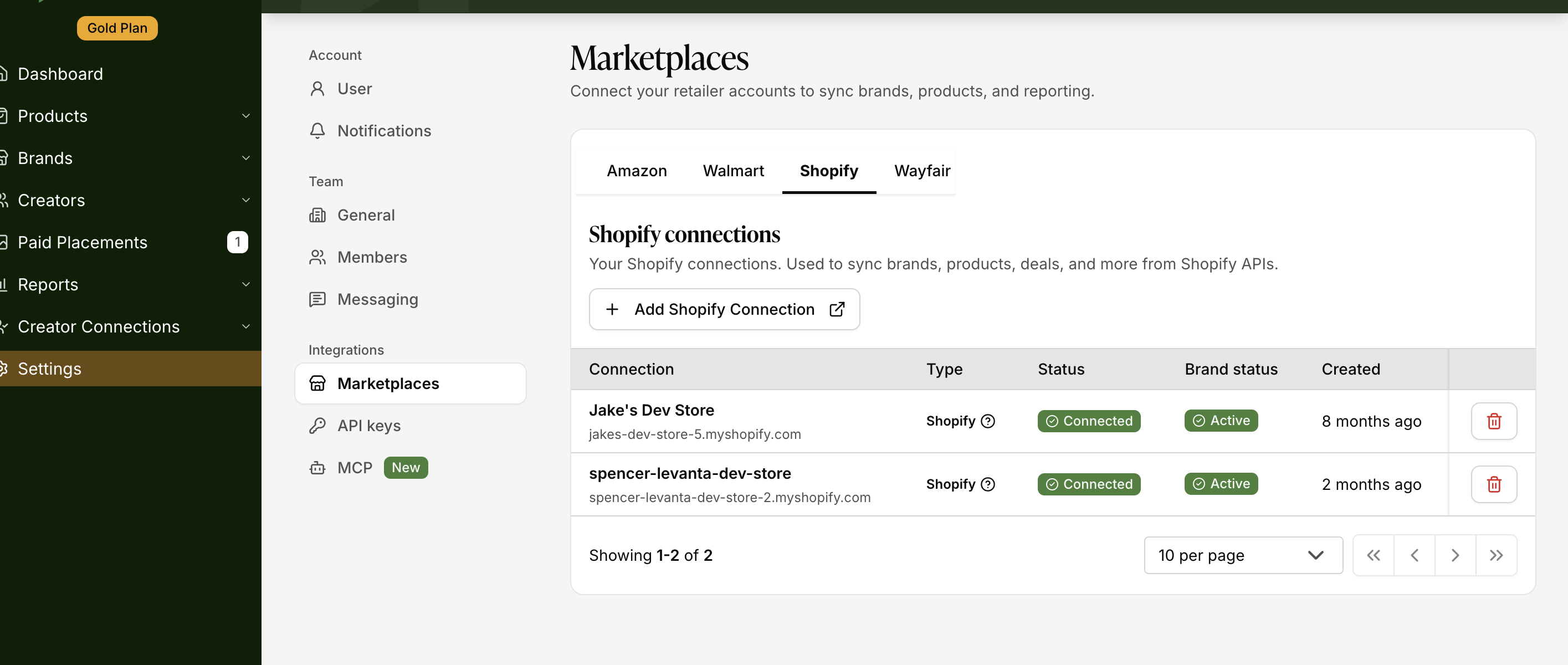
Navigate to Settings → Connections → Add Shopify to connect your Shopify store
Once connected, activate your Shopify products and set commissions for DTC sales tracking
Wayfair
Navigate to Settings → Connections → Add Wayfair to connect your Wayfair account
Set Wayfair-specific commissions and recruit compatible creators
Phase 9: Reporting & Ongoing Optimization
A strong program requires consistent monitoring and proactive management. Review these reports regularly to stay on top of overall performance.
Report | Where to Find It | What to Look For |
|---|---|---|
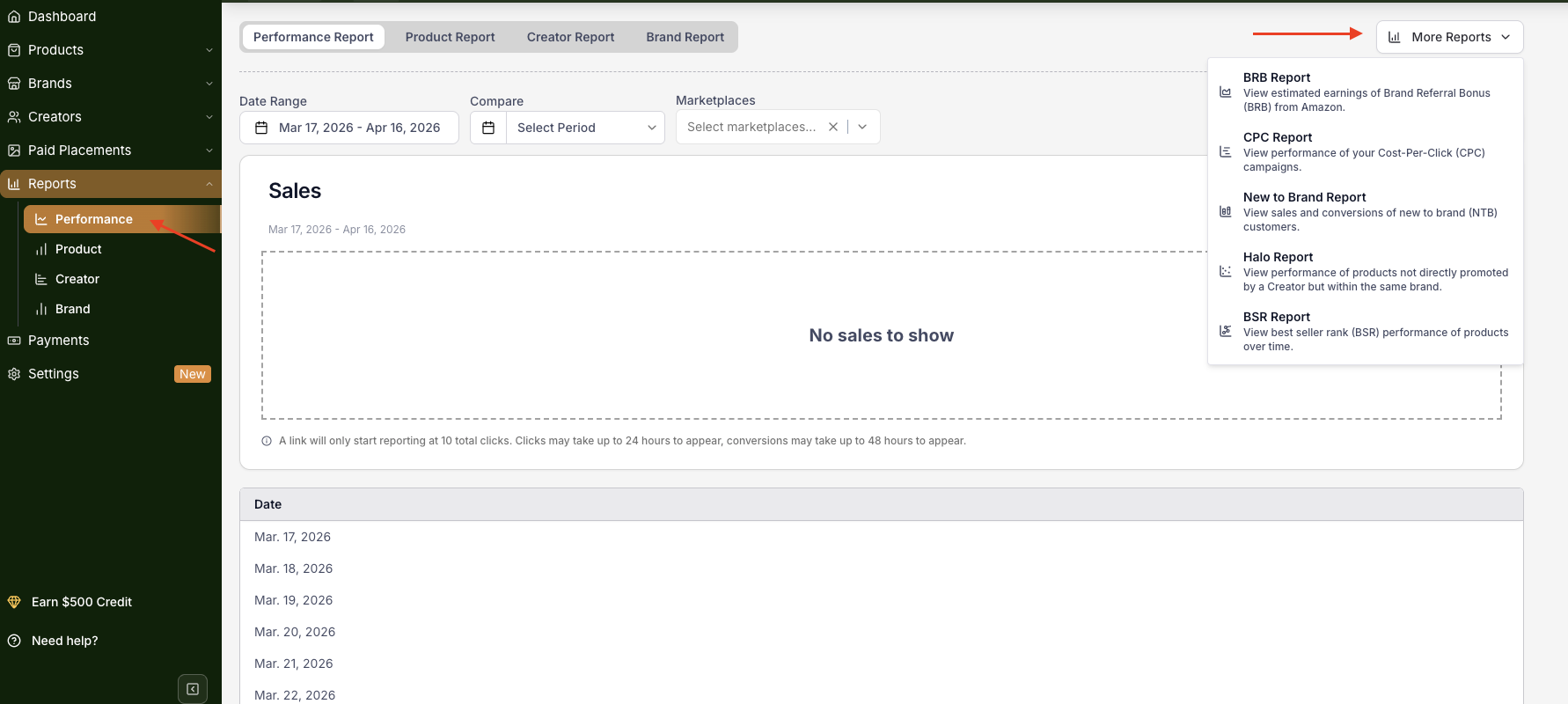
Performance Dashboard | Reports → Performance | Overall clicks, conversions, and sales broken down by creator |
Creator Report | Reports → Creator | Top performers to consider for private commissions or LBP upgrades |
New to Brand (NTB) Report | Reports → More Reports → New to Brand | Share of first-time customers (new customer acquisition) |
BSR Report | Reports → More Reports → BSR Report | Organic rank lift driven by affiliate activity |
BRB Report | Reports → More Reports → BRB Report | Estimated Brand Referral Bonus (BRB) earnings |
CC Campaign Report | CC → Campaigns | Creator Connections campaign performance (viewed alongside Levanta data) |
Ongoing best practices:
Re-engage inactive creators with a personalized message, a private commission offer, or a Paid Placement proposal (Paid Placements are not available for Wayfair)
Brief creators before every peak season — upload relevant Deals, publish an Announcement, then follow up via Messenger with your top partners for maximum impact
Wayfair suppliers: diagnosing underperformance
No links created yet — often about timing, not lack of interest. Creators may be waiting on product seasonality, have a full content calendar, or be holding out for a sale to promote. Give it time, then follow up after about a month if there's still no activity.
Links created, but results are weak — try offering a promo code or coupon to drive urgency, suggest a better-fit product from your catalog, offer a private commission, or simply ask the creator directly what would help them be more successful promoting your brand.
Suggested cadence: check performance weekly or biweekly early on, and use scheduled CSM check-ins to review account health and adjust strategy.
Questions or Need Help? Our team is here to support you! Reach out to your dedicated CSM or email us at cs@levanta.io