Levanta Account Setup Guide: Amazon, Walmart, Shopify, Wayfair & Brand Configuration
Last updated: October 5, 2026
This guide walks you through the core steps to set up and manage your Levanta account — from connecting your marketplaces to configuring your brand profile and uploading brand assets. Follow each section to ensure your account is fully configured and ready to run.
Connect Your Amazon Account
To get started, you'll need to connect your Amazon account to Levanta. This enables attribution tracking, product syncing, and sample fulfillment.
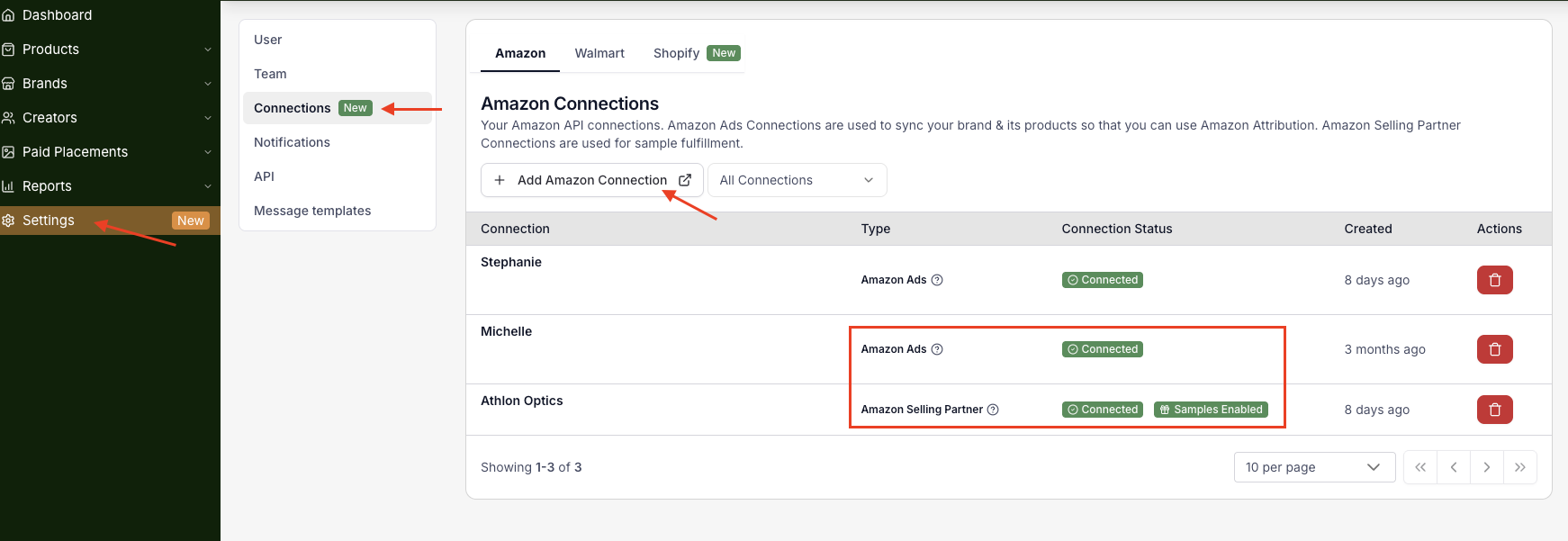
1. Navigate to Settings → Connections
2. Under the Amazon tab, click + Add Amazon Connection
3. Follow the prompts to authorize your Amazon Ads account
Once connected, your associated brands and products will be pulled in automatically.
There are two types of Amazon connections:
Amazon Ads — Required for Amazon Attribution tracking. This syncs your brand and products, so clicks and conversions are tracked correctly in Levanta
Amazon Selling Partner — Required if you plan to send product samples to creators through the platform. Once connected, you'll see a Samples Enabled badge on the connection
Note: Multiple Amazon accounts are supported. Repeat the steps above to add additional accounts if needed.
Connect Walmart
If you sell on Walmart, you can connect your Walmart account to recruit creators, set custom commissions, and access Walmart-specific reporting — all from the same Levanta dashboard.
1. Navigate to Settings → Connections
2. Click the Walmart tab
3. Click + Add Walmart Connection and follow the prompts
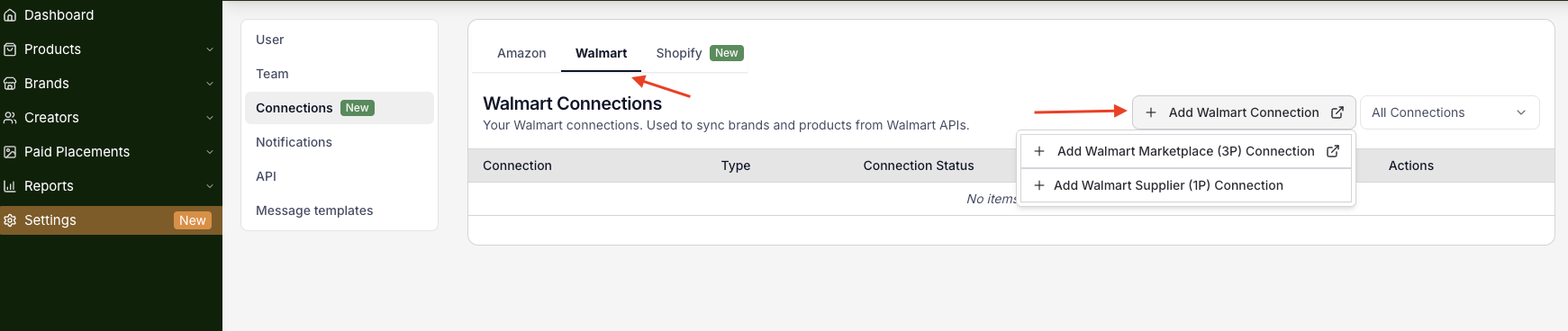
Note: Once your Walmart connection is added, notify your CSM so they can complete the activation on the backend.
Connect Shopify
Sellers with a Shopify store can connect it to Levanta to track DTC sales and expand their affiliate program beyond Amazon.
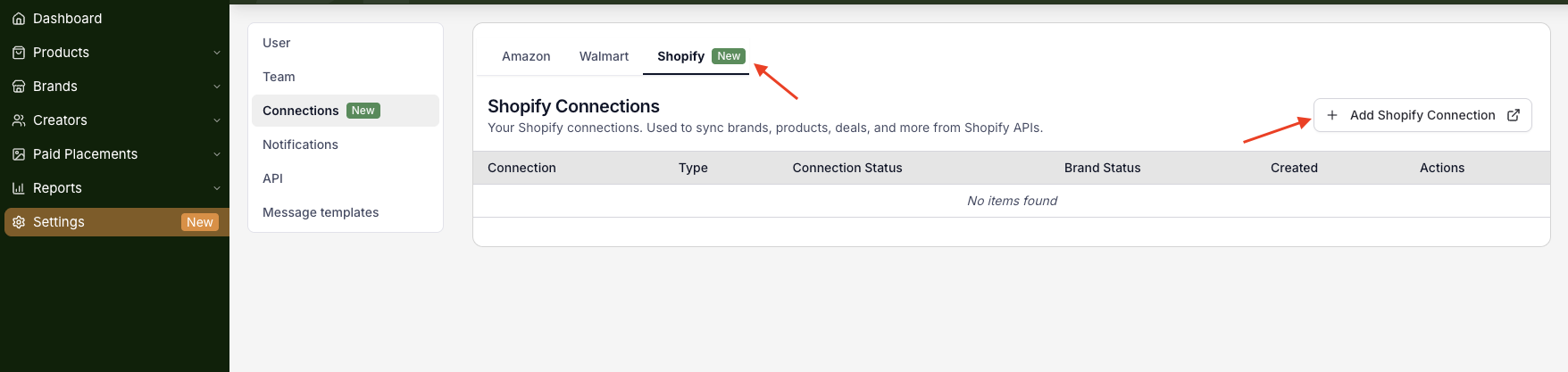
1. Navigate to Settings → Connections
2. Click the Shopify tab
3. Click + Add Shopify Connection and follow the authorization prompts
Connect Wayfair
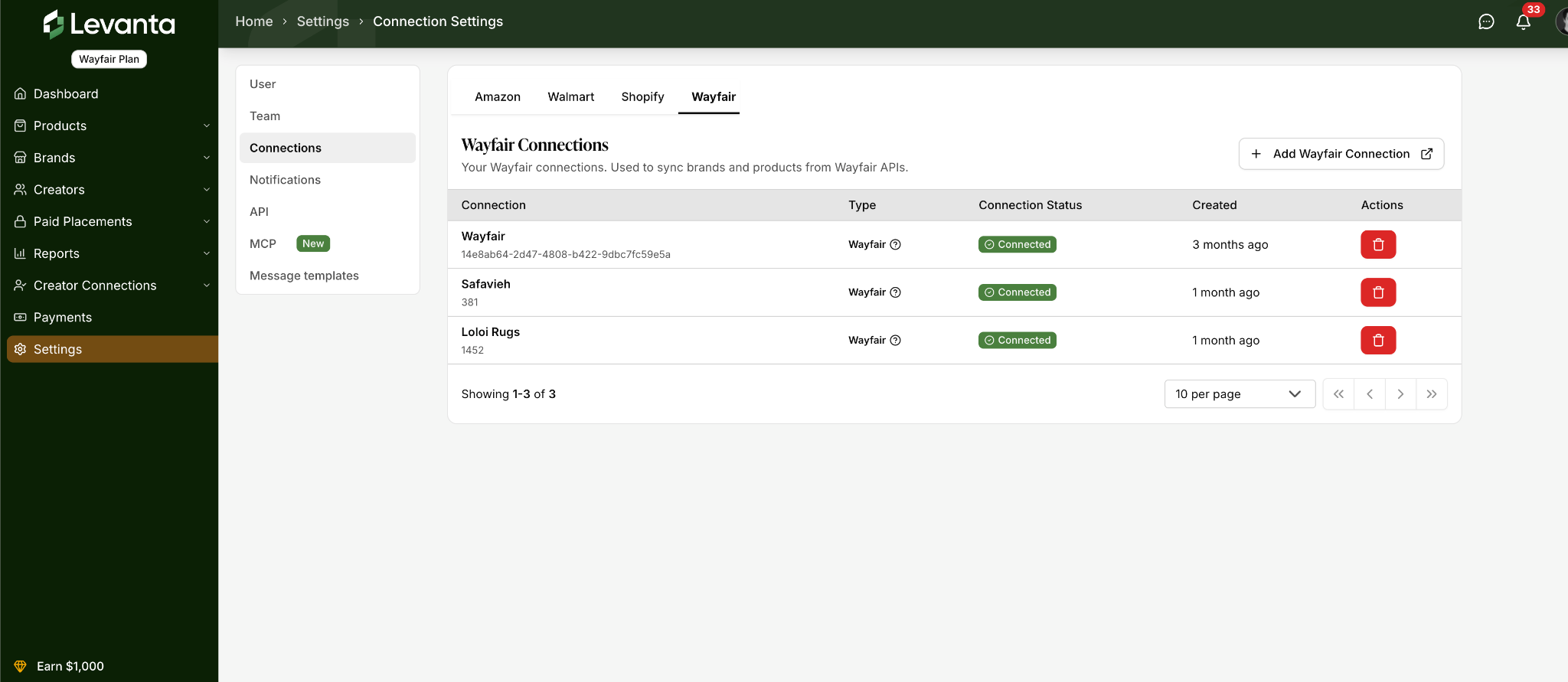
If you sell on Wayfair, you can connect your Wayfair account to recruit creators, set custom commissions, and access Wayfair-specific reporting, all from the same Levanta dashboard. The connection is set up under Settings → Connections, in the same place as your Amazon, Walmart, and Shopify connections.
Adding Wayfair is free. There is no additional Levanta SaaS fee, no variable fee, and no plan upgrade required.
1. Navigate to Settings → Connections
2. Click the Wayfair tab
3. Click + Add Wayfair Connection and follow the prompts to log in to your supplier account
Set Up Your Brand Profile
Your Brand Profile is visible to creators in the Levanta marketplace. A complete, well-presented profile builds trust and increases your acceptance rate among quality creators.
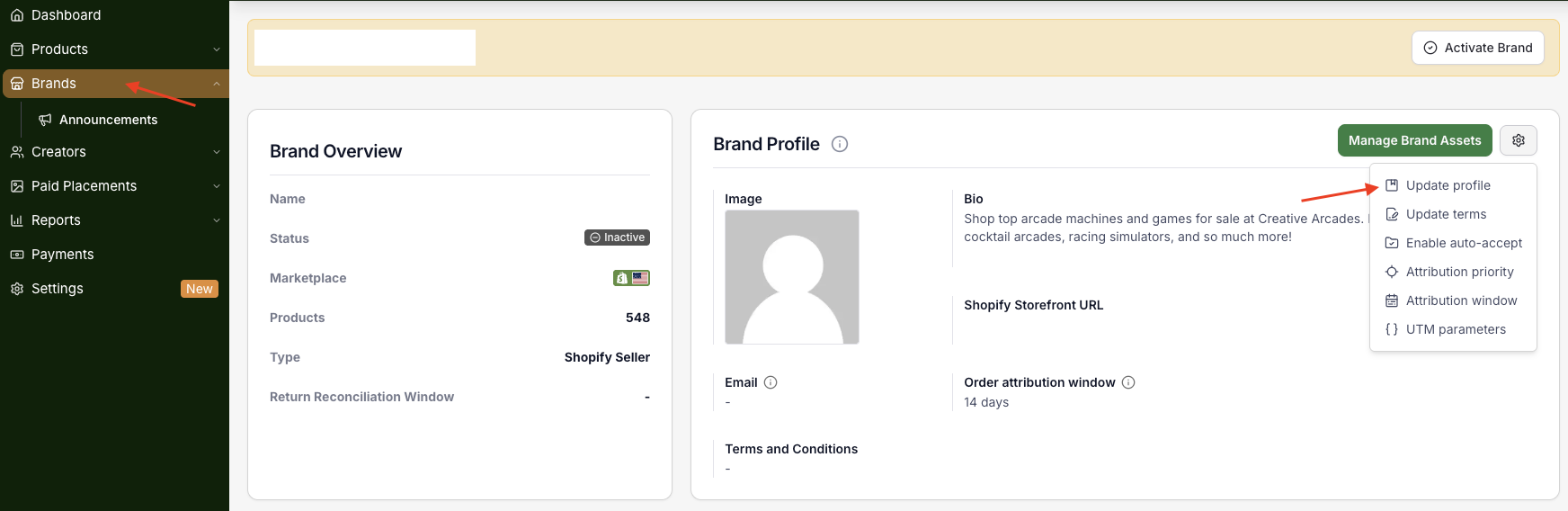
Navigate to Brands and select your brand to access the Brand Profile editor. Fill in the following:
Brand Bio — A short description of your brand and what you sell
Amazon Storefront URL — Links creators directly to your Amazon storefront
Contact Email — The email address creators can use to reach your team
Terms and Conditions — Link to your brand's affiliate terms
Troubleshooting: Amazon Storefront URL Not Pulling In
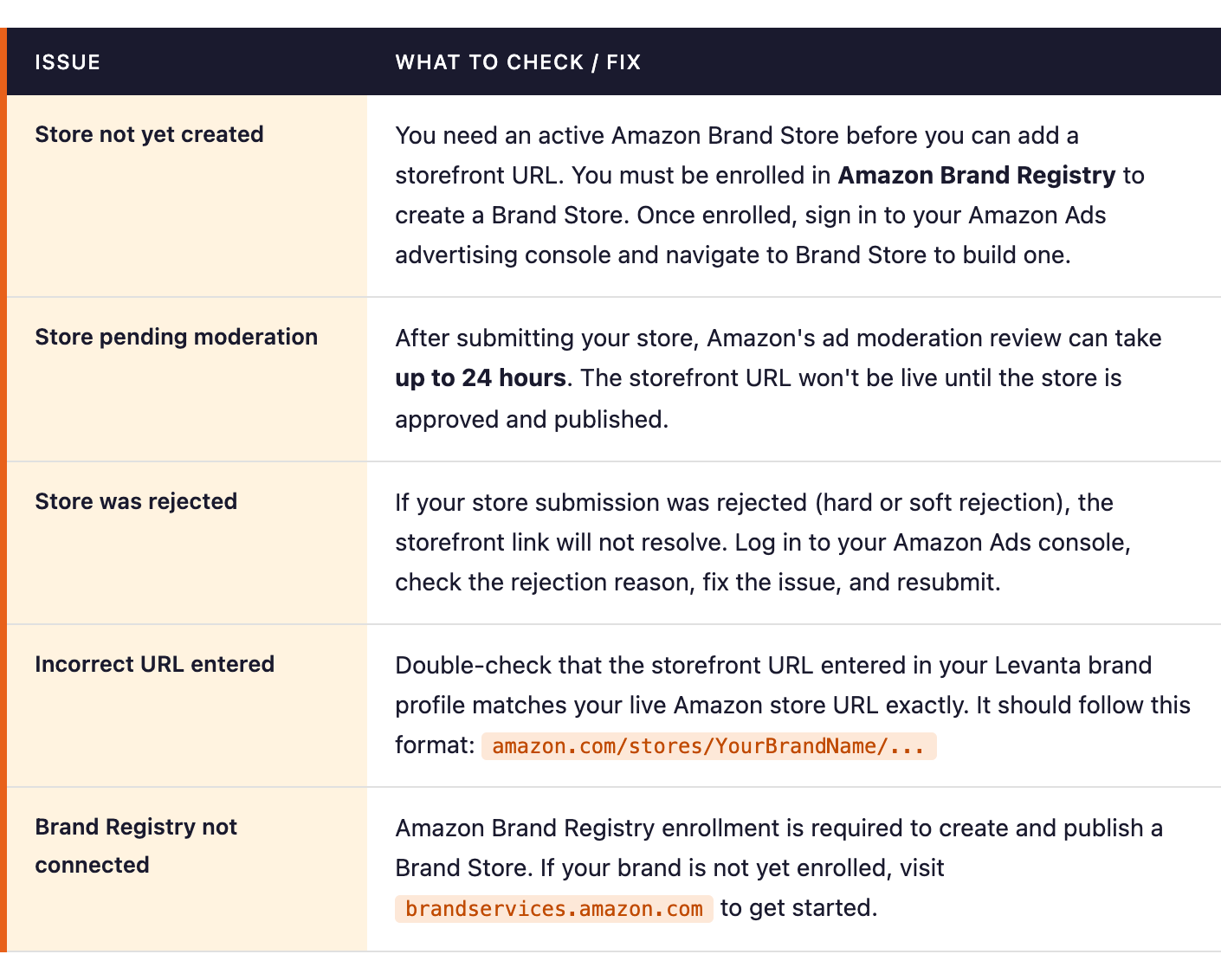
If your Amazon storefront URL isn't appearing correctly on your Levanta brand profile, or creators are reporting that the storefront link isn't working, the issue is almost always on the Amazon side. Here's what to check:
How to Create Your Amazon Brand Store
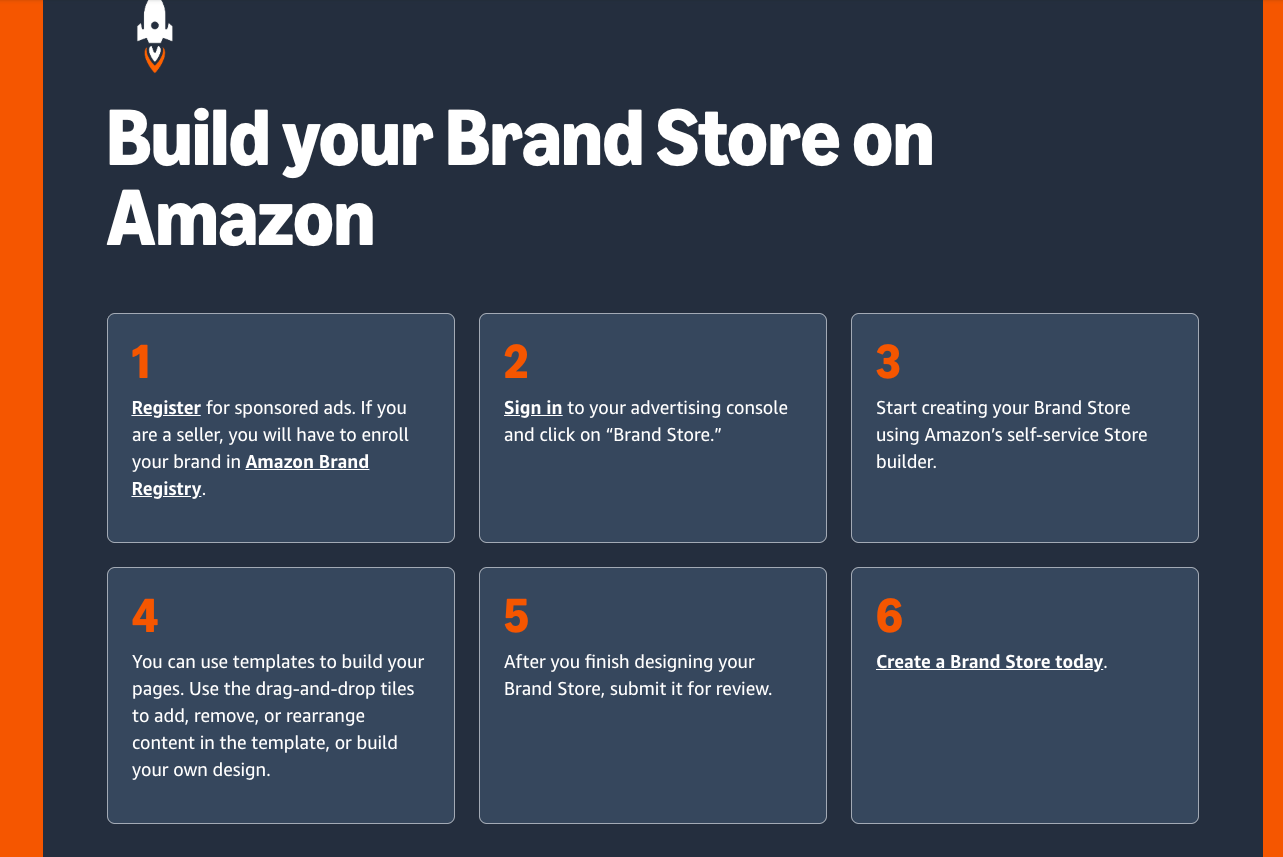
If you don't yet have an Amazon Brand Store, here's how to get one set up:
1. Register for Amazon Brand Registry at brandservices.amazon.com. You'll need an active registered trademark for your brand.
2. Sign in to your Amazon Ads advertising console and click Brand Store.
3. Use Amazon's self-service Store Builder to design your storefront. You can use pre-built templates and a drag-and-drop editor to add products, imagery, and brand content.
4. Submit your store for review when you're ready. Moderation takes up to 24 hours.
5. Once approved and live, copy your storefront URL and paste it into your Levanta brand profile under Amazon Storefront URL.
Upload Brand Assets
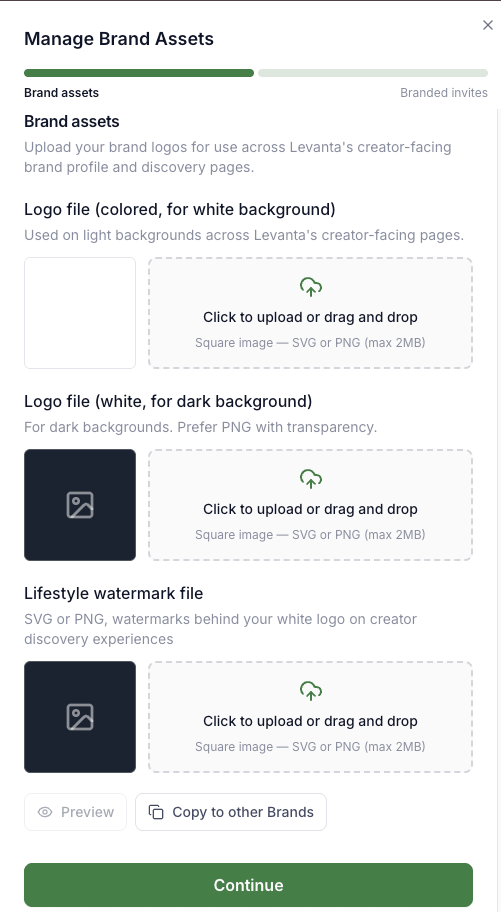
Levanta now includes a dedicated Manage Brand Assets feature that lets you upload and manage your brand logos directly within the platform. These assets are used across Levanta's creator-facing discovery pages, featured brand placements, and branded creator sign-up flows.
To access it, navigate to your Brand Profile and click the Manage Brand Assets button in the top right corner of the Brand Profile card. This opens an asset management drawer where you can upload:
Logo file (colored, for white background) — Used on light backgrounds across creator-facing pages. Upload as a square SVG or PNG (max 2MB)
Logo file (white, for dark background) — Used on dark backgrounds. PNG with transparency is preferred. Upload as a square SVG or PNG (max 2MB)
Lifestyle watermark file — Appears as a watermark behind your white logo on creator discovery pages. Upload as SVG or PNG (max 2MB)
Once uploaded, click Preview to review how your assets appear, or use Copy to other Brands to apply the same assets across all your brands at once — a major time-saver if you manage multiple brands under one account.
Note: Brand assets are used to power featured brand placements in Levanta's creator discovery experience and branded creator sign-up flows. Keeping these up to date improves your brand's visibility in the marketplace.
Manage Multiple Marketplaces
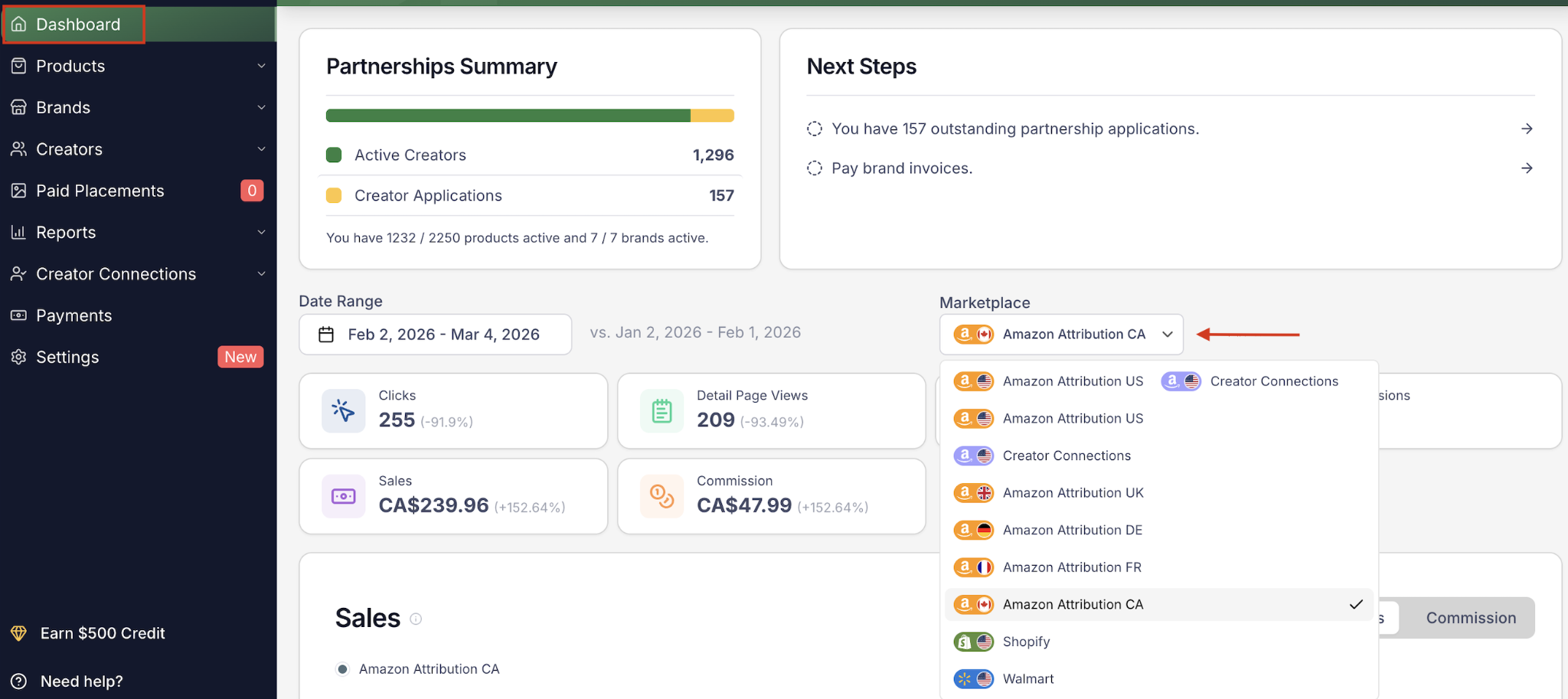
Levanta supports managing your affiliate program across multiple marketplaces — including Amazon (global regions), Walmart, Shopify, and Wayfair — all from a single account.
Use the marketplace selector within your dashboard to toggle between regions and retailers. Your Payments section provides a unified view of all invoices across all connected marketplaces, regardless of which marketplace is currently selected.
Key Notes:
Each Levanta module — Dashboard, Products, Brands, etc. — will display data based on the currently selected marketplace.
The Payments module is an exception and will show a unified view of all invoices across marketplaces, regardless of which marketplace is selected in the toggle.
Depending on your current plan, you may need to upgrade to access additional global Amazon regions or Walmart functionality. This does not apply to Wayfair, which is not plan-gated.
Questions or Need Help? Our team is here to support you! Reach out to your dedicated CSM or email us at cs@levanta.io