Levanta's Klaviyo Integration
Last updated: August 7, 2026
Turn creator milestones into automated email moments
Every day, creators in your program hit milestones worth acting on: they accept a partnership, receive a sample, generate a discount code, drive their first sale, or go quiet for a month. Levanta's Klaviyo integration sends those milestones straight into Klaviyo as events, along with the creator's email address, so you can build automations that keep creators engaged without lifting a finger. Welcome new partners, follow up on unused samples, celebrate a first sale, or re-engage a dormant creator, all triggered automatically from what's happening in Levanta.
Events Levanta sends to Klaviyo
Event | Fires when |
|---|---|
Partnership Accepted - Levanta | A creator accepts a partnership with your brand |
Sample Received - Levanta | A creator marks a product sample as received |
Discount Code Created - Levanta | A creator generates a discount code for your brand |
First Creator Sale - Levanta | A creator drives their first sale |
No Creator Activity Prior Month - Levanta | A creator has had no activity in the previous month |
Each event includes the creator's email address, so you can target them directly in a Klaviyo flow.
How to connect Klaviyo
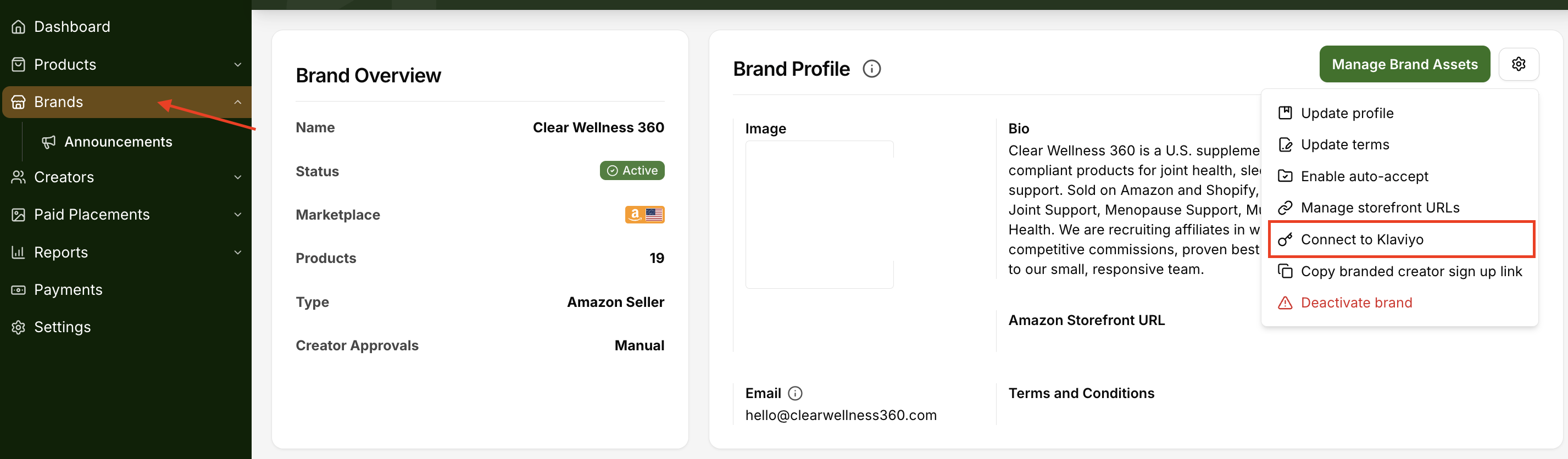
Go to your brand's Brand Details page.
Click the settings (gear) icon next to Manage Brand Assets.
Select Connect to Klaviyo.
Enter your Klaviyo Private API key.
That's it. Once connected, Levanta will begin sending the events above to Klaviyo automatically.
What to do next
In Klaviyo, build flows off of these events the same way you would any other trigger, for example:
Send a welcome email when Partnership Accepted - Levanta fires.
Send care instructions or a check-in when Sample Received - Levanta fires.
Say thanks and share more products when First Creator Sale - Levanta fires.
Send a re-engagement nudge when No Creator Activity Prior Month - Levanta fires.
Need help?
Reach out to your Levanta account team if you don't see the Connect to Klaviyo option, or if events aren't showing up in Klaviyo after connecting.