Getting Started with Creators
Last updated: October 5, 2026
Collaborating with Creators on Levanta
The Creator Marketplace makes it easy to discover, filter, and connect with creators directly in your Levanta dashboard.
Scope note: Wayfair is supported for creator recruitment, messaging, announcements, and affiliate commissions. Product sampling and Paid Placements are not part of the Wayfair program at launch.
Exploring the Marketplace
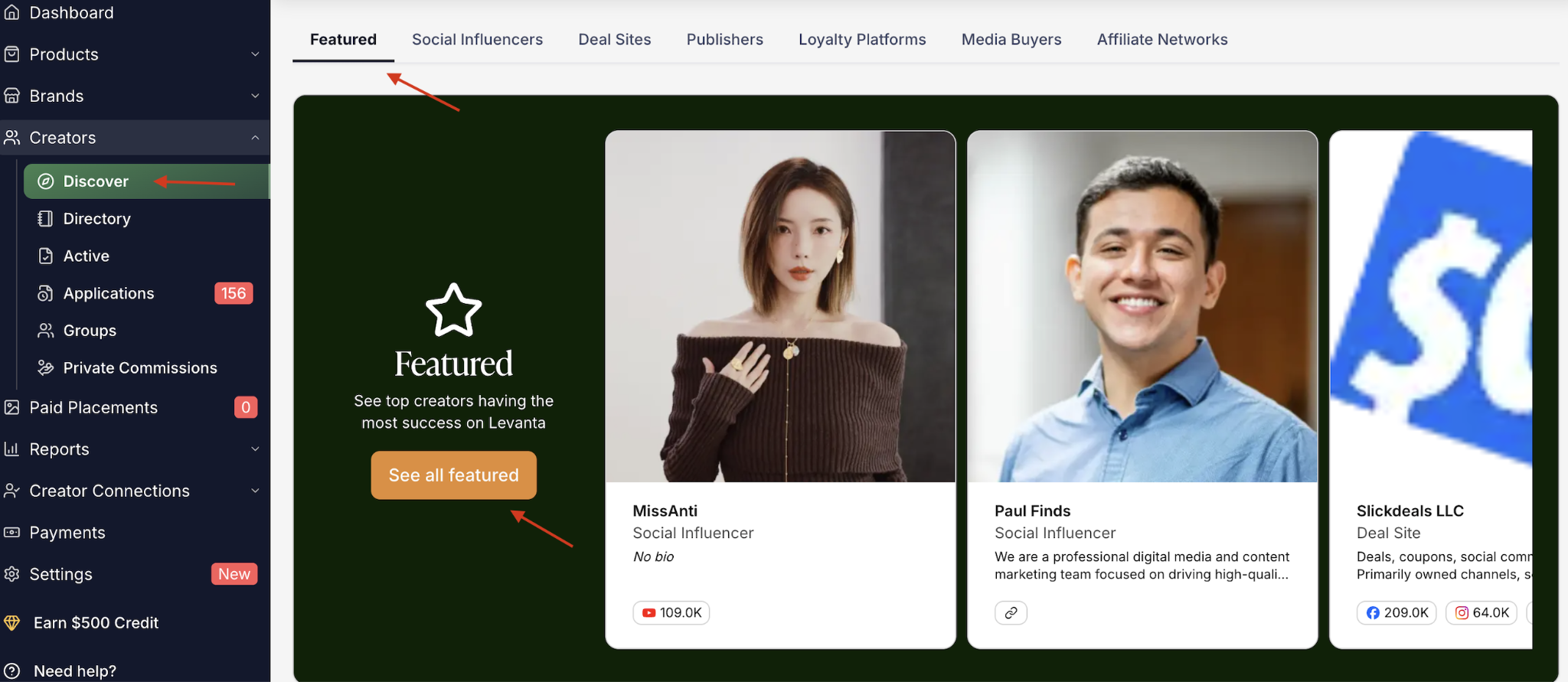
Navigate to Creators → Discover.
You will immediately see Featured Creators, which highlight Levanta's top-performing partners. To view the full list, click “See All Featured.”
Scroll to browse creators by categories such as: Social Influencers, Deal Sites, Publishers, Loyalty Platforms, Media Buyers, Affiliate Networks
These categories help you easily find partners that best align with your brand and campaign goals.
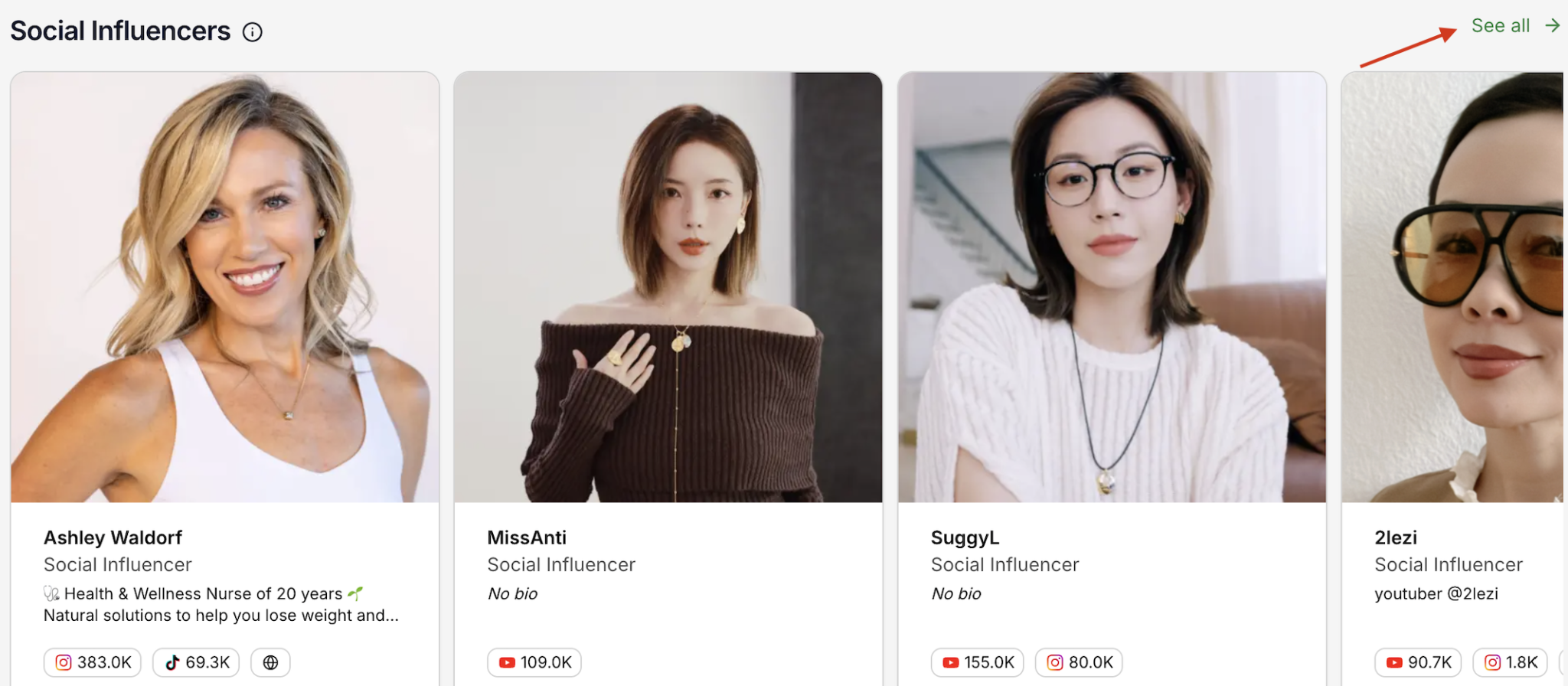
Viewing All Creators
Select See More to explore the full marketplace.
Creator Directory
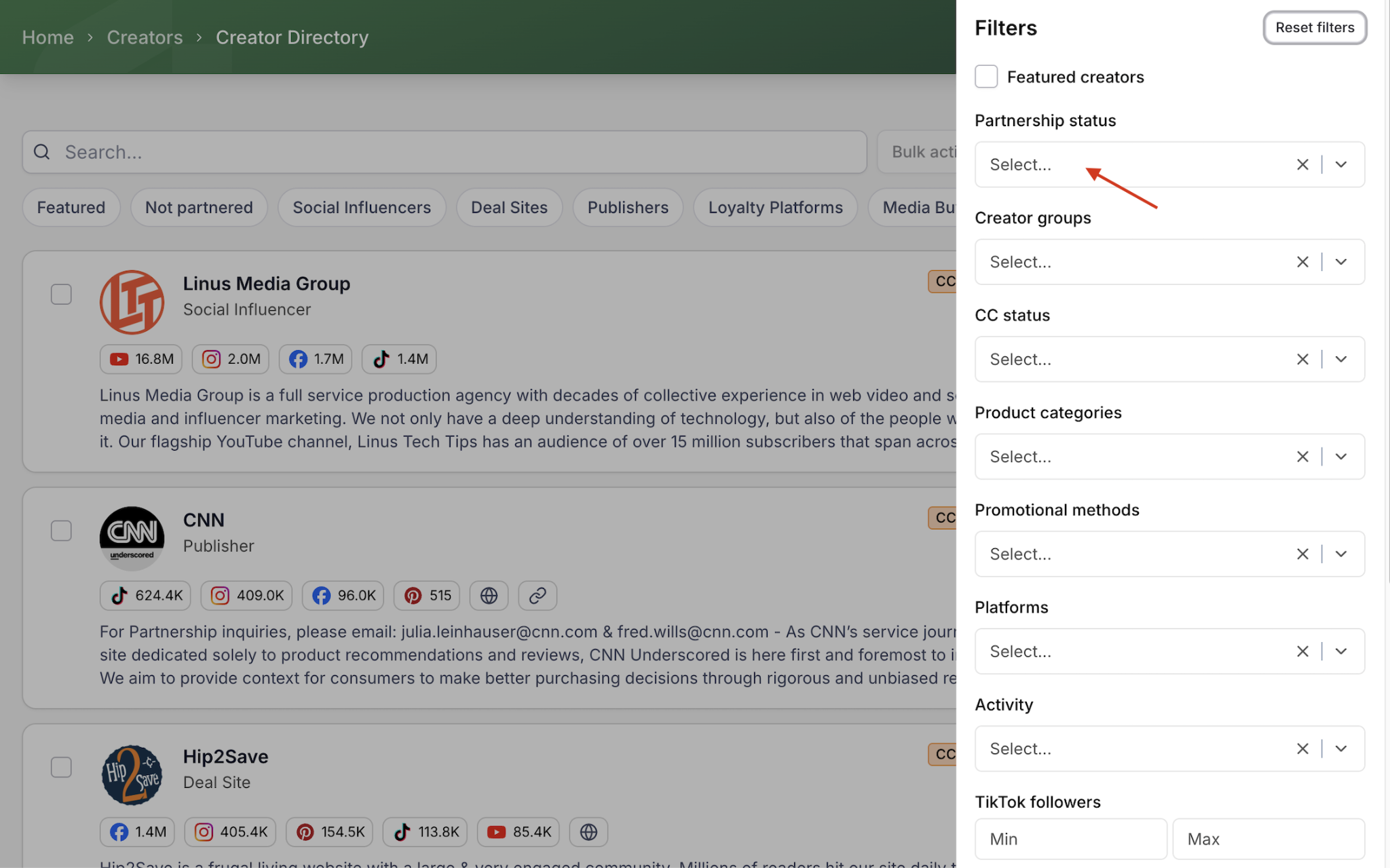
The Creator Directory helps you easily discover, filter, and connect with creators that are relevant to your brand.
From this page, you can:
Search creators using the search bar.
Filter creators based on specific criteria such as CC Status, Product Categories, Promotional Methods, Platforms, Activity, TikTok Followers, Partnership Status, and Creator Groups
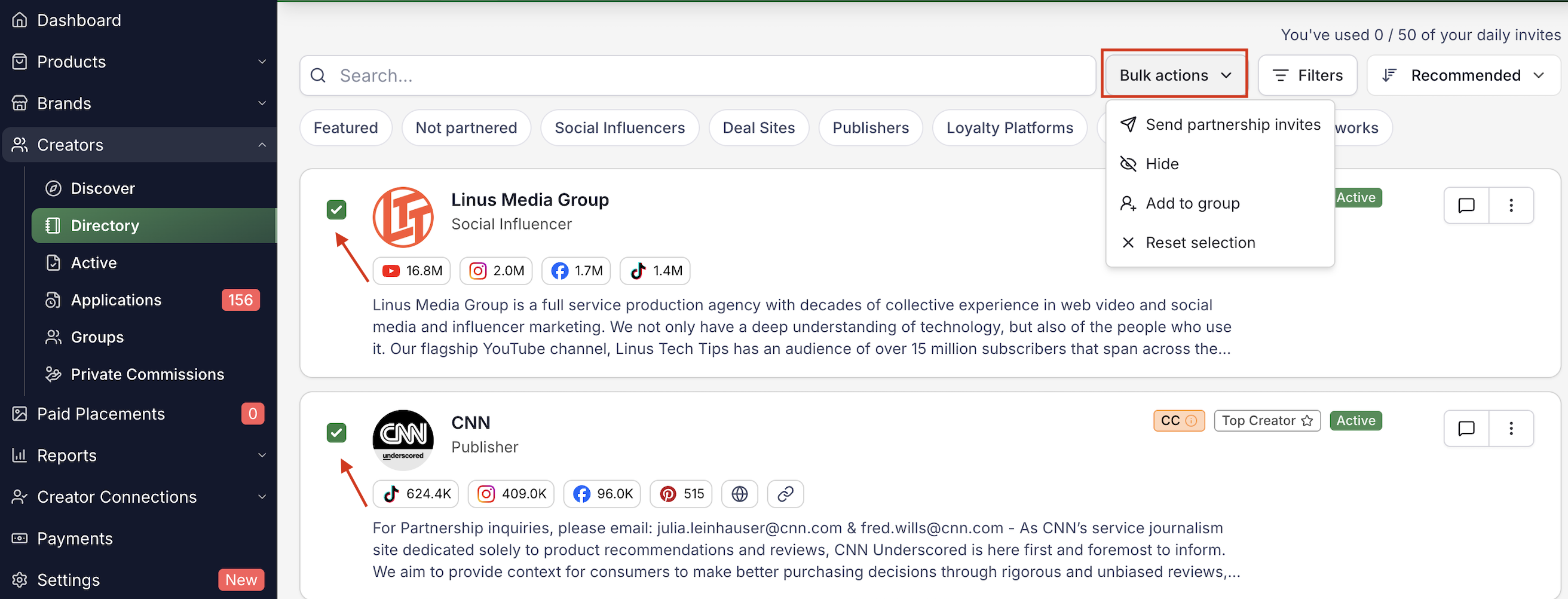
Use Bulk Actions to send partnership invitations to multiple creators at once.
Use the Recommended dropdown to sort creators in the directory. You can view Recommended creators suggested for your brand or switch to Recently Joined to discover the newest creators who have recently joined the platform.

These tools help you quickly find and connect with creators who best match your campaign goals and audience.
Inviting Creators
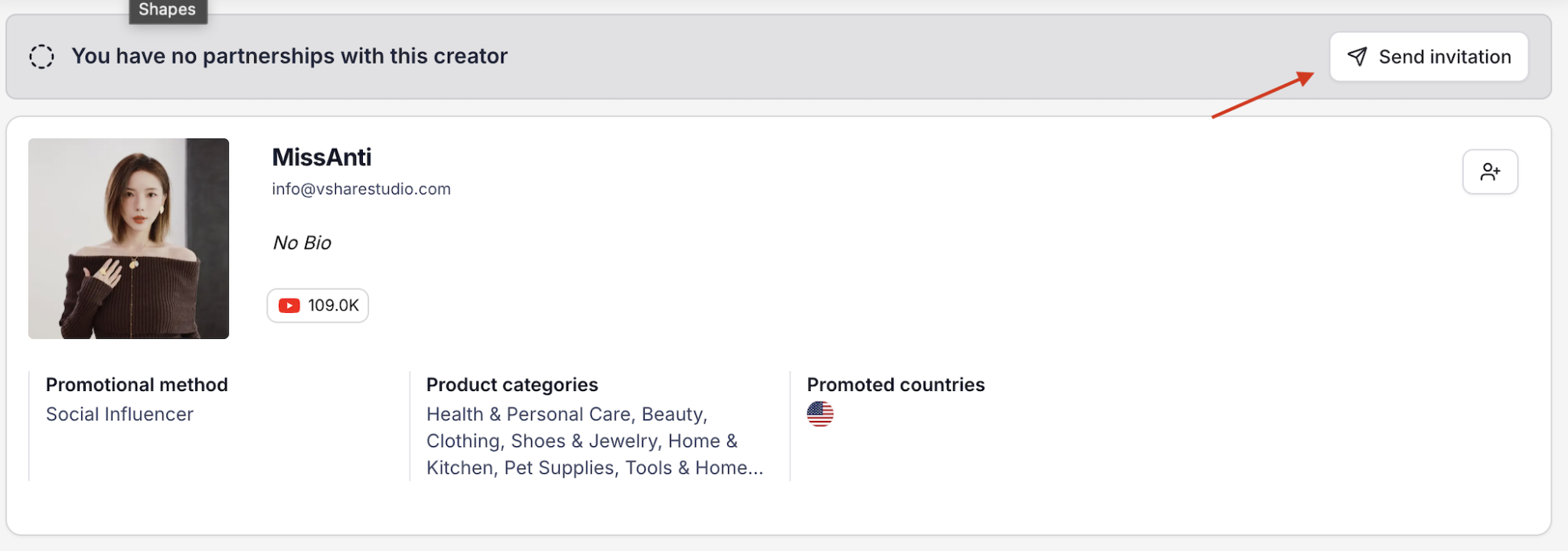
Click Send Invitation on the right-hand side of a creator's profile
For better results, include a personalized message with your invite.
While the Creator Marketplace is a powerful tool for quick wins in affiliate recruitment, the most successful programs also recruit outside of Levanta. Combine marketplace outreach with your own recruitment strategies to maximize growth.
Wayfair suppliers: leverage your network
If you work with agencies, media partners, or other brands, check whether they have existing relationships with creators you're targeting — a warm introduction converts better than a cold invite.
Sending a Welcome Message
We recommend sending a friendly, actionable welcome message once creators join your program.
Template:
Hey [Creator Name],
It's exciting to see that you've joined [Affiliate Program Name]!
We're sure you'll enjoy promoting [Product(s)].
To make onboarding smooth, here are some useful links:
Generating and Managing Affiliate Links in Levanta
Getting Started with Levanta: A Comprehensive Guide for Creators
If you need anything else, feel free to reach out.
Best,
The [Affiliate Program Name] Team
Recruiting External Creators
Why Recruit Externally?
Affiliate programs thrive on relationship-building. Marketplace recruiting is powerful, but external outreach ensures long-term growth.
Gold plan users: Access Branded Creator Sign-Up Pages
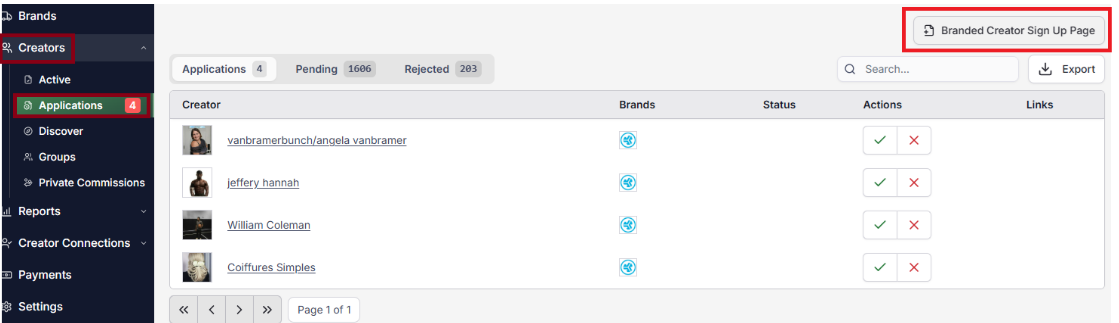
Standard plan users: Direct prospects to Levanta's standard Creator sign-up page → then Levanta approves → creators apply to your brand's program.
Wayfair suppliers: recruitment tips
Invite Wayfair's recommended creators and publishers — Wayfair and Levanta have pre-built recommended affiliate groupings by category, so you can bulk-invite a curated, historically strong-performing list instead of starting from zero.
Follow the “Rule of 3 to 5” touchpoints when following up on pending invitations, spacing outreach across Levanta messages and email. You can export your pending creator list from the Applications tab to follow up directly outside the platform.
Build an inbound channel: add your Branded Creator Sign-up Page to your website, social bios, and email signature so creators can discover and apply without you reaching out first.
Recruitment Email Template
[Insert Commission %] | [Insert Significant Unique Selling Point (USP)] and [what types of products you sell]
Hi [Creator Name],
[Brand Name] is a [Product Category] brand that sells a range of products, including [insert product 1, 2, and 3] from [insert the price range here if you have high price point products/skip if you don't] and we're offering an average of [insert commission % again here] commission for our best sellers.
Our top product is:
Link to Product - USP #1, #2, #3
Other products that you may be interested in promoting are the following:
Link to Product 2 - USP #1, #2, #3
Link to Product 3 - USP #1, #2, #3
Link to Product 4 - USP #1, #2, #3
Here's some more information about our brand as well (Choose 3 from the USP suggestions list below to include)
USP 1
USP 2
USP 3
We look forward to partnering with you!
Sincerely, [Brand Name]
Note: For more details, check out our Affiliate Recruitment Book.
Wayfair suppliers: this template's format matters
Leading with “Commission % | Biggest USP” is the single biggest driver of whether a creator opens and responds to your message. Strong USPs include high review counts/ratings, high order volume, certifications or awards, product variety, visual assets (brand guides, product videos), and brand mission.
Branded Creator Sign Up Page
The Branded Creator Sign Up Page is a powerful recruitment tool for your affiliate program.
Prospective affiliates will see your brand's logo on the page.
When they sign up, they're added directly to your affiliate program (no wait for Levanta team approval).
This makes it easier to attract and quickly activate new partners.
How to Access Your Branded Sign-Up Page
1. Upgrade to a Levanta Gold subscription plan.
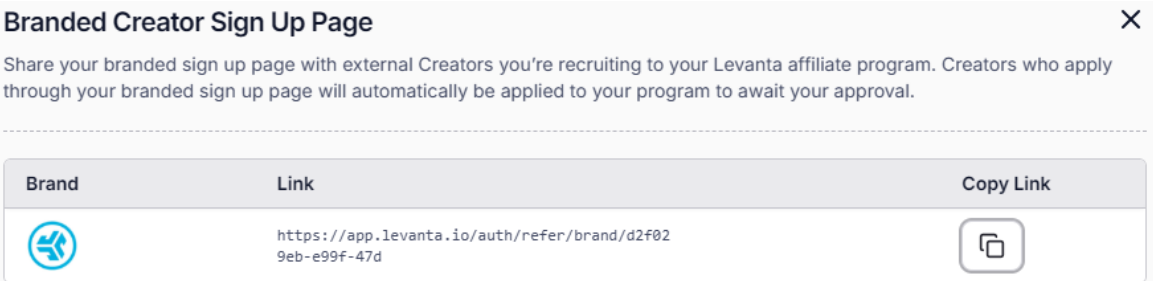
2. Navigate to Creators → Applications.
3. Click the Branded Creator Sign Up Page button in the top right.
4. Select a brand and click the Copy Link icon next to it.
5. Share the copied link with prospects.
Reviewing Creator Applications
Navigate to Creators → Applications to review applications.
Check:
Bio, region, promotional methods
Website/social handles (confirm alignment with methods)
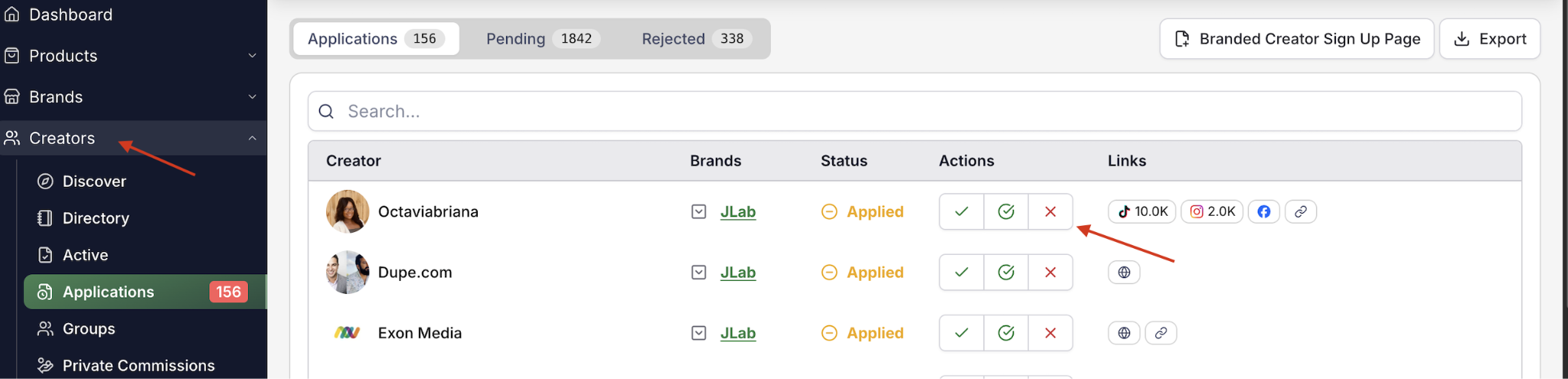
Approve if aligned—creators can immediately promote and earn commissions.
Contacting & Managing Creators
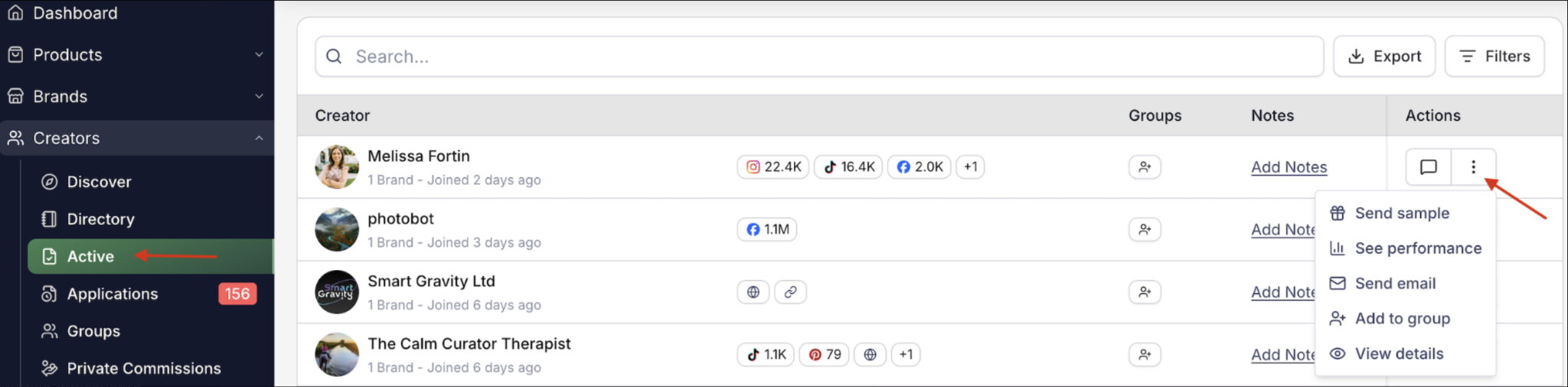
From the Creators → Active page, you can manage and interact with creators directly using the Actions menu (three-dot icon) beside each creator.
Available actions include:
See performance – View the creator's performance metrics and campaign results.
Send email – Contact the creator via email through their creator profile.
Add to group – Organize creators into groups for easier management and campaign tracking.
View details – Open the creator's profile to see additional information and activity.
Send product samples directly (not available for Wayfair at launch)
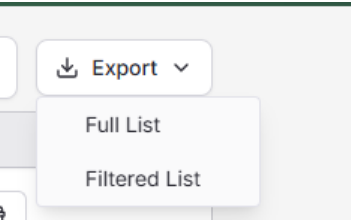
For a full list, export active partnerships: Creators → Active → downloads a CSV with creator info + email addresses.
Using In-App Messaging Across Brands & Marketplaces
Levanta's in-app messaging system allows Sellers/Brands and Creators to communicate directly, in real time. You can easily share product links, media kits, campaign details, and more—all within the platform.
Before you start messaging, it's helpful to understand how to navigate across brands and marketplaces within the in-app messaging view
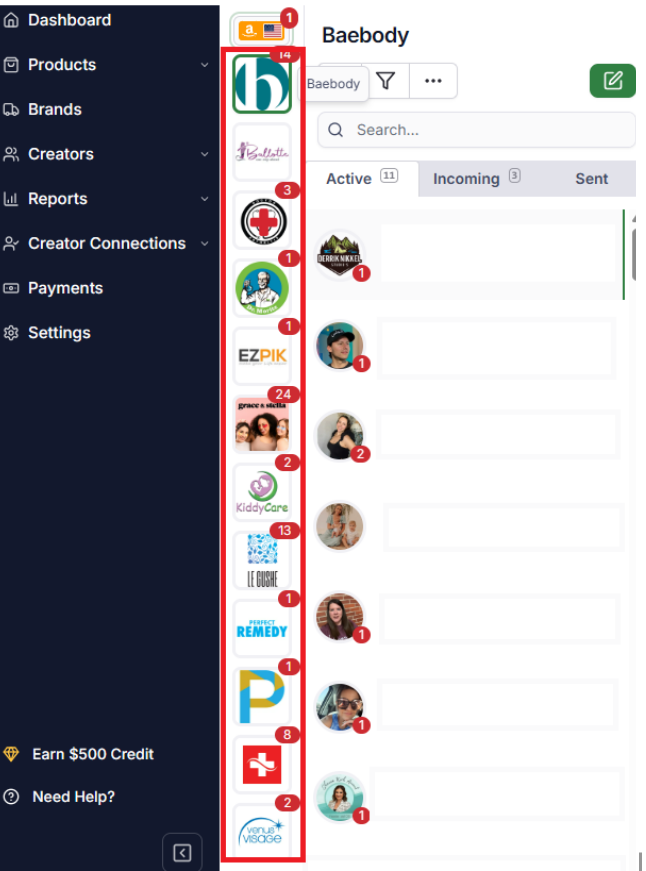
1. Switching Between Brands (if you have multiple)
If your Levanta account manages more than one brand, you can switch between them right from the in-app messaging interface.
2. Switching Marketplaces
You can easily switch between different marketplaces from the marketplace selector in the sidebar. Each icon represents a marketplace (such as Amazon, Walmart, Shopify, or Wayfair) along with its corresponding country or region. Simply click the marketplace you want to access to switch views.
Note: Not every Levanta feature is available on every marketplace. Product sampling and Paid Placements are not part of the Wayfair program at launch.
Choosing a Messaging Persona
If your account manages multiple brands, you can choose to send messages as either a Brand or a Seller.
Brand View:
Communicate with creators at the brand level.
Each brand has its own separate conversation threads.
Only the brand name is visible to the creator.
Seller View:
Communicate with creators at the seller (team) level.
One single conversation thread per creator, regardless of brand.
Your team name is displayed to the creator.
Note: Be careful when switching between Brand and Seller view. Message history is lost when switching from Seller → Brand view.
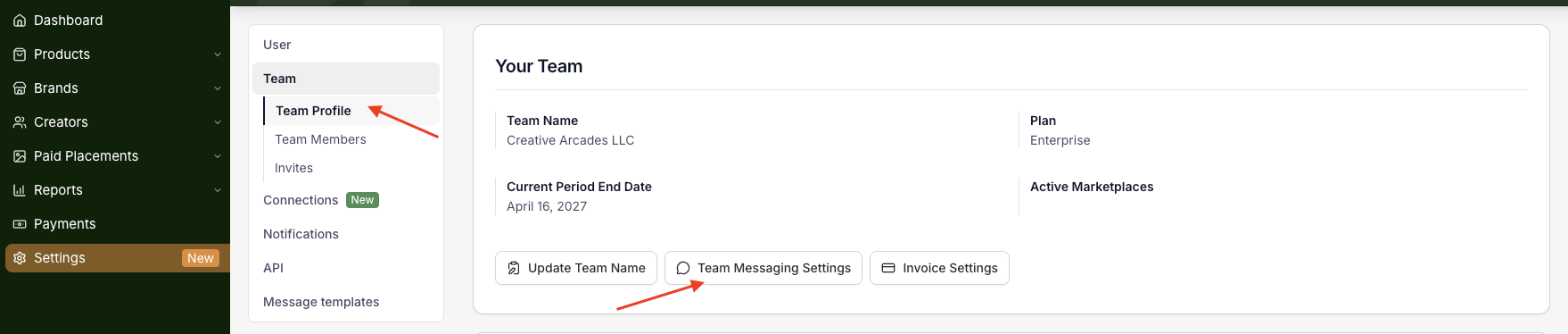
To adjust this setting: Go to Settings → Team → Team Messaging Settings.
Create an Announcement
You can create announcements to notify your creator partners about promotions, updates, or important brand information.
How to Create an Announcement:
Navigate to Brands → Announcements.
1. Click Create new announcement.
2. Select the Brand you want to send the announcement from.
3. Choose the Recipients: All partnered creators / A creator group / All partnered creators except specific creators
4. Enter the announcement details and message.
5. Click Publish to send the announcement.
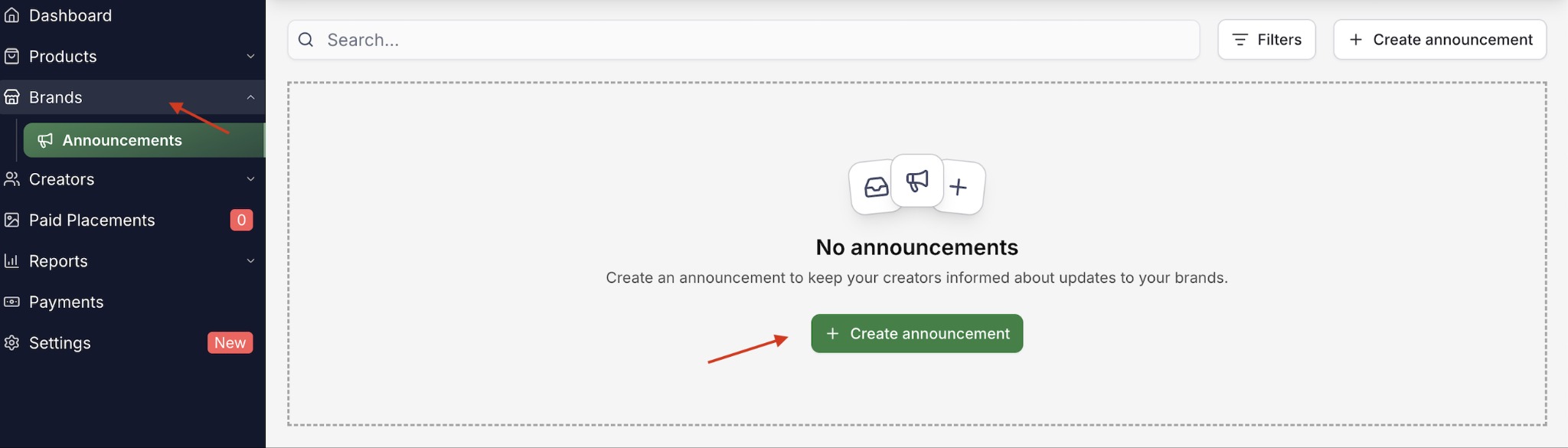
Note: You can send up to 2 announcements every 7 days.
Wayfair suppliers: tie announcements to the Wayfair sales calendar
Use Announcements to flag Wayfair deals and promotions ahead of Way Day, seasonal moments, and category clearance events — then send a reminder right before the deal goes live for maximum impact.
Tips to Onboard and Engage Creators in Levanta
1. Review Applications Daily
Approve creator applications as soon as possible.
Quick approvals increase the chance they'll choose your program over others.
Many creators apply with the immediate intent to promote.
2. Send an Actionable Welcome Letter
Welcome new creators with a personalized message via in-app messaging.
Include: media kit, top-selling products, example content with affiliate links, commission rates & attribution window (14 days on Levanta), contact details (also visible on your brand detail page)
3. Launch an Activation Campaign
Incentivize new creators to promote quickly. Examples: double commission for the first 30 days, bonus on first or second sale
Target campaigns to specific segments (e.g., content creators vs. deal sites).
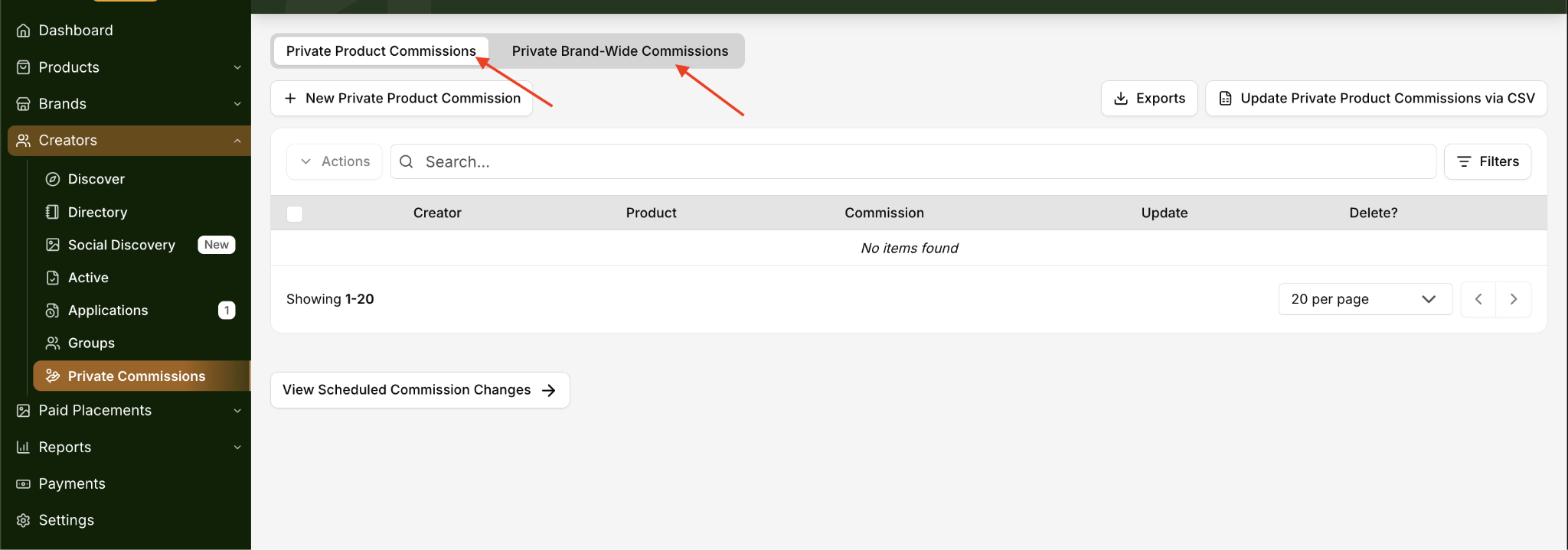
With Levanta, you can set custom private commissions per affiliate.
4. Establish a Communication Schedule
Keep affiliates engaged through bulk messages (newsletters).
Share: deals and promotions, new product launches, case studies, and success stories
Consistent outreach keeps your program top-of-mind.
5. Build Personal Rapport
Affiliate marketing is relationship-driven.
Show genuine interest in your affiliates' work (blogs, social accounts, etc.).
Attend industry events and set up one-on-one meetings with key partners.
Strong relationships lead to long-term collaboration and trust.
Questions or Need Help? Our team is here to support you! Reach out to your dedicated CSM or email us at cs@levanta.io