Understanding Team Members, User Roles & Permissions
Last updated: April 14, 2026
Levanta offers four user roles to help you manage your team's access to your creator account. Each role is designed for different levels of responsibility, from full administrative control to unbiased, content-focused access.
The Four User Roles
Admin
Full access to everything. Admins can manage all aspects of your Levanta account, including payments, invoicing, team settings, reporting, and all creator tools. This role is typically reserved for account owners or senior team members who need complete control.
Member
Access to all reporting, performance data, and creator tools. Members can view commission rates, loyalty bonus targets, and earnings against those bonuses. However, Members cannot access payment information, invoicing, or update team details. This role is ideal for team members who need visibility into performance without financial administration responsibilities.
Contributor
Access to products, brands, messaging, samples, and all creator tools. Contributors can also view commission rates and loyalty bonus targets to make informed decisions about which products to promote. They cannot access reporting, performance data, or earnings information. This role works well for team members focused on content creation and strategic product selection.
Editor
The most focused role, with access limited to products, brands, messaging, and samples. Editors cannot view any monetary information, including commission rates or loyalty bonus targets. This role is designed for team members who help with content and product management but don't need visibility into financial details in any way.
Permissions Overview
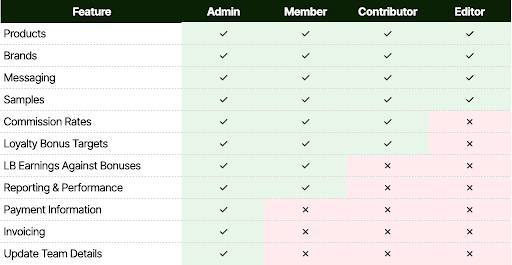
The chart below shows exactly what each role can access. Permissions cascade from Admin (full access) down to Editor (content-only access).
✓ indicates the role has access to that feature. ✗ indicates no access.
How to Add Team Members
To invite a new team member, go to Settings → Team and click "Invite Member." Enter their email address and select the appropriate role. They'll receive an email invitation to join your account.
Changing a User's Role
Admins can change any team member's role at any time. Navigate to Settings → Team, find the team member, and select their new role from the dropdown menu. Changes take effect immediately.
Questions?
If you have questions about which role is right for your team members, reach out to your account manager or cs@levanta.io. We're happy to help you set up the right access levels for your workflow.