Managing Product Samples in Levanta
Last updated: August 21, 2026
Overview
Easily fulfill, approve, and track product sample requests from creators—all within your Levanta dashboard.
Note: Product sampling is available only for Gold and Enterprise sellers. If you’d like to upgrade, please contact us at cs@levanta.io for further assistance.
Enabling Samples for Amazon
Adding Your Amazon Selling Partner Connection
Note: You must add your Amazon Selling Partner connection in order to use the Samples feature.
To add the connection:
Go to Settings → Connections → Add Amazon Connection → Add Amazon Selling Partner Connection.
From the dropdown menu, select the last option, “Add Amazon Selling Partner Connection.”
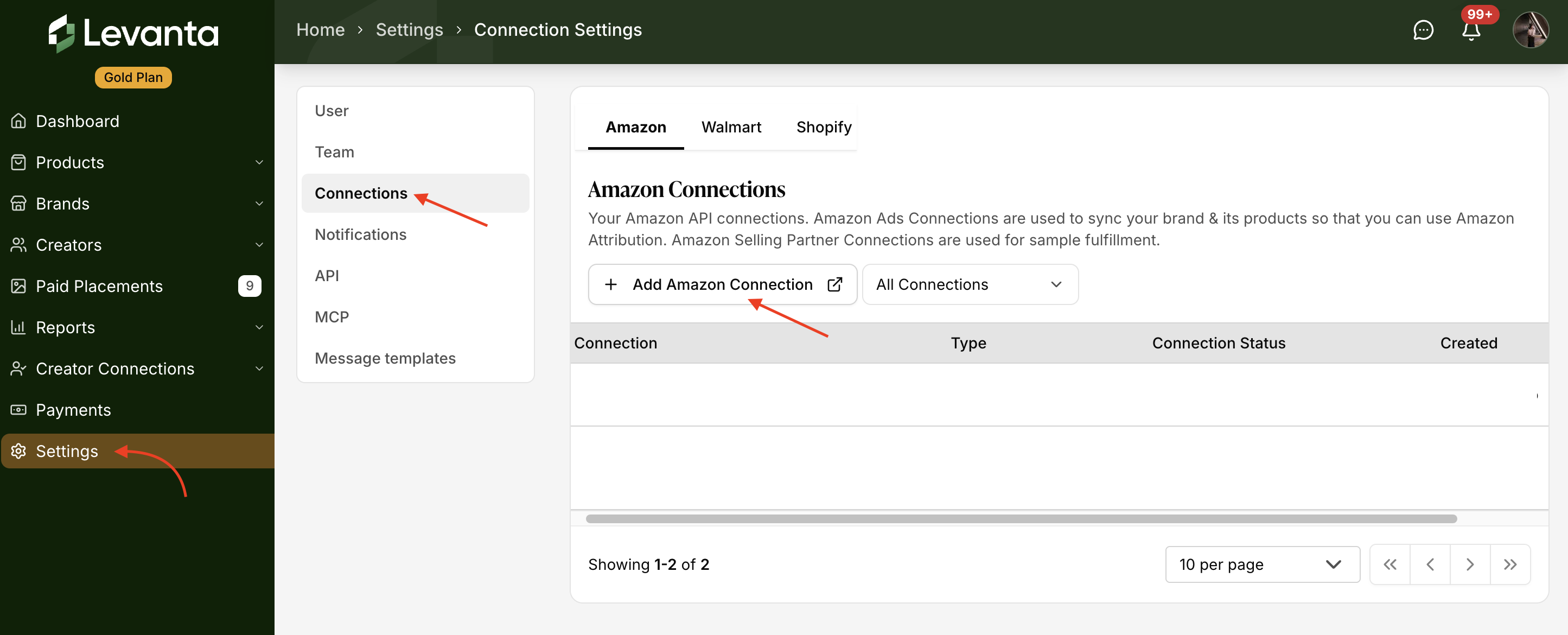
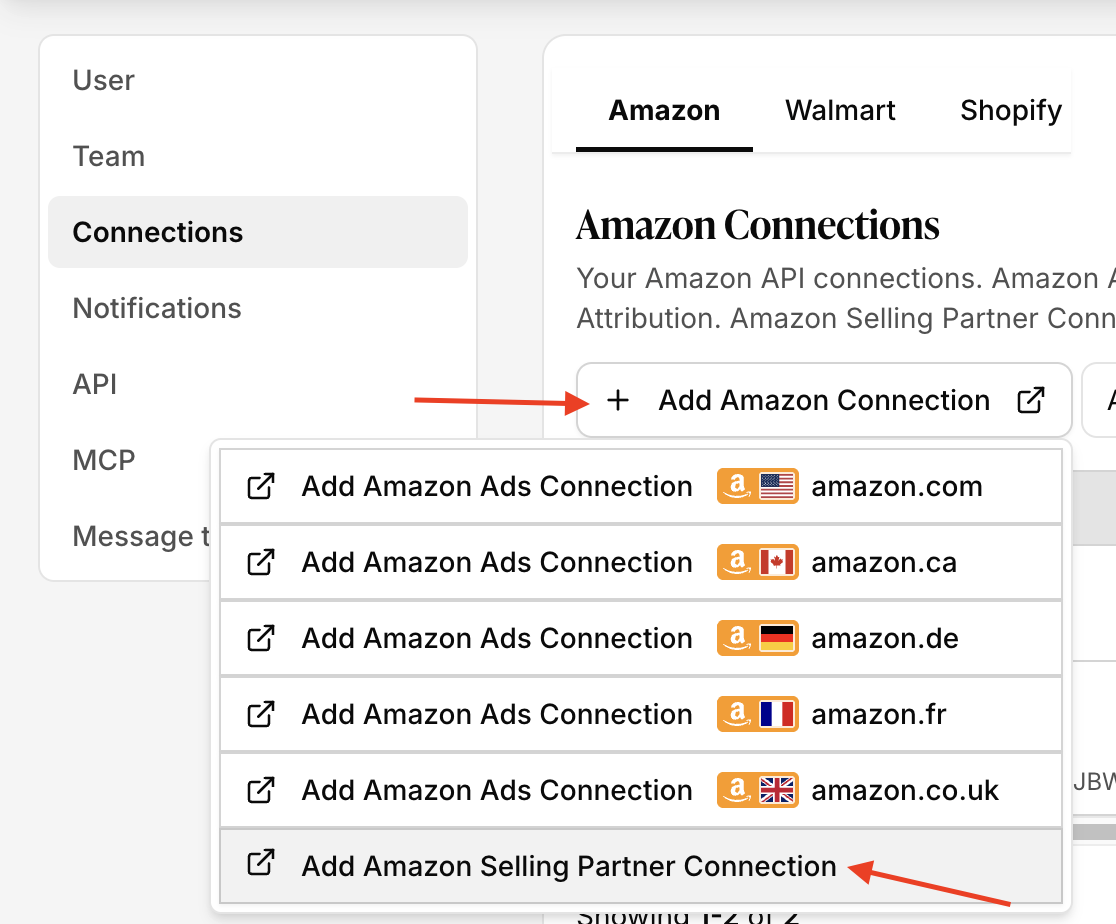
⚠ Be sure to choose this final option — the others are for Amazon Ads and will not connect your Selling Partner account.
Once connected, your Amazon Selling Partner account will unlock the Samples feature within Levanta.
Enabling Samples for Shopify
You can also enable samples for products connected through Shopify. To do this, make sure your Shopify account is connected in Levanta:
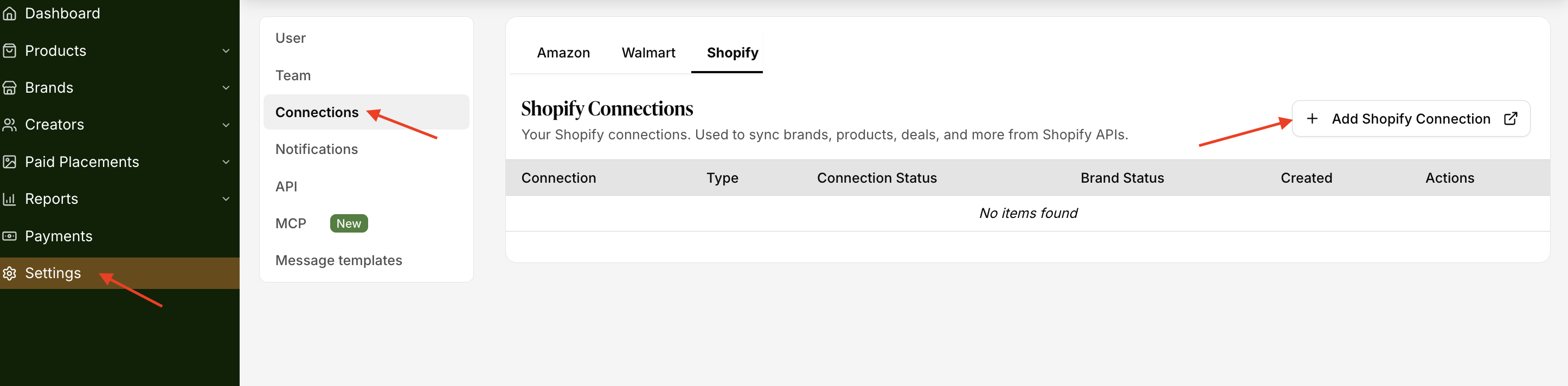
Go to Settings → Connections → Shopify → Add Shopify Connection and follow the steps to connect your store.
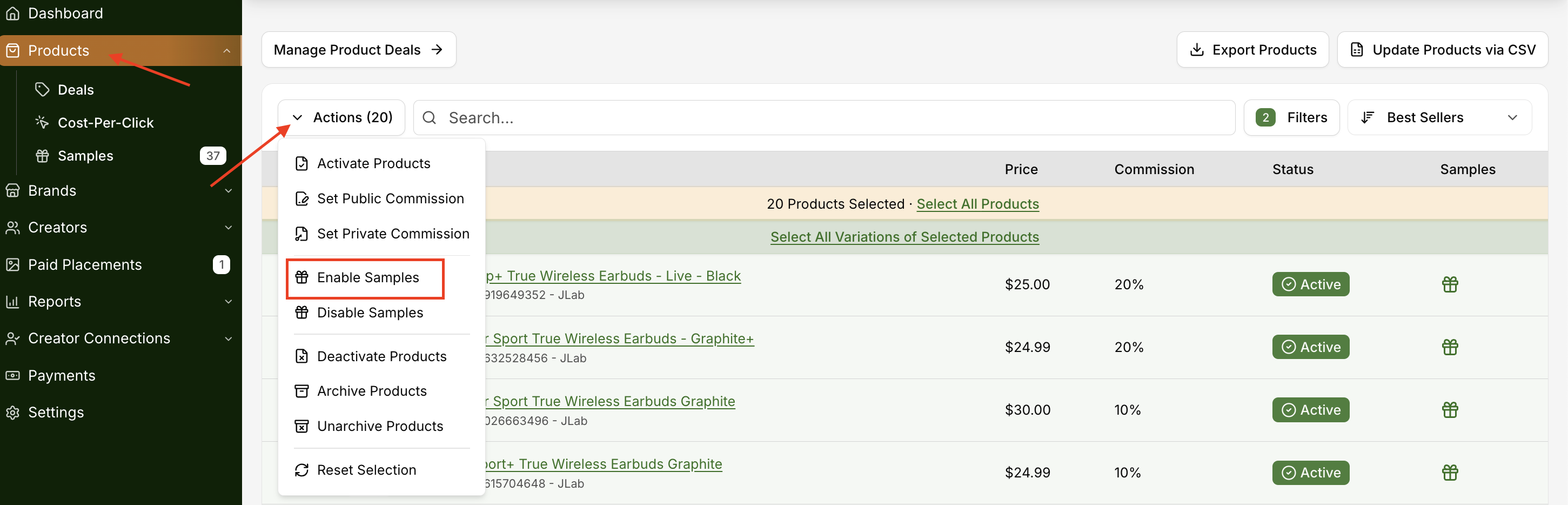
Once your store is connected and your brand has been activated, go to the Products tab.
Select the product(s) you'd like to enable samples for.
Under Actions, choose Enable Samples.
How Shopify Samples Are Fulfilled & Billed
When a seller approves a sample request for a product synced via the Shopify integration, Levanta automatically creates a $0.00 order in the seller's Shopify store for the requested item.
What this means:
Order Cost: Levanta automatically creates a $0.00 order in the seller's Shopify store for the requested item.
Platform Fees: There is currently no per-unit automation fee from Levanta for Shopify-fulfilled samples. Since the order value is $0, the standard 3.5% Shopify attribution fee also results in $0.
Fulfillment Costs: The seller is responsible for any shipping costs or fulfillment fees charged by their own 3PL or warehouse, as the order is processed within their existing Shopify fulfillment workflow.
Summary: If a seller is using Shopify to fulfill samples, they won't see a per-unit charge from Levanta. The order simply appears in their Shopify admin tagged as “created by the Levanta app,” so their team can ship it out as part of their normal daily operations.
The Sample Dashboard
Your Samples tab (under Products) is the central hub for:
Requests- All sample requests from creators. You can approve or reject them here.
Pending Acceptance - Samples you've initiated to send. Creators may accept or decline.
Approved- Requests you approved, including samples accepted by creators.
Rejected- Samples rejected by either you or the creator.
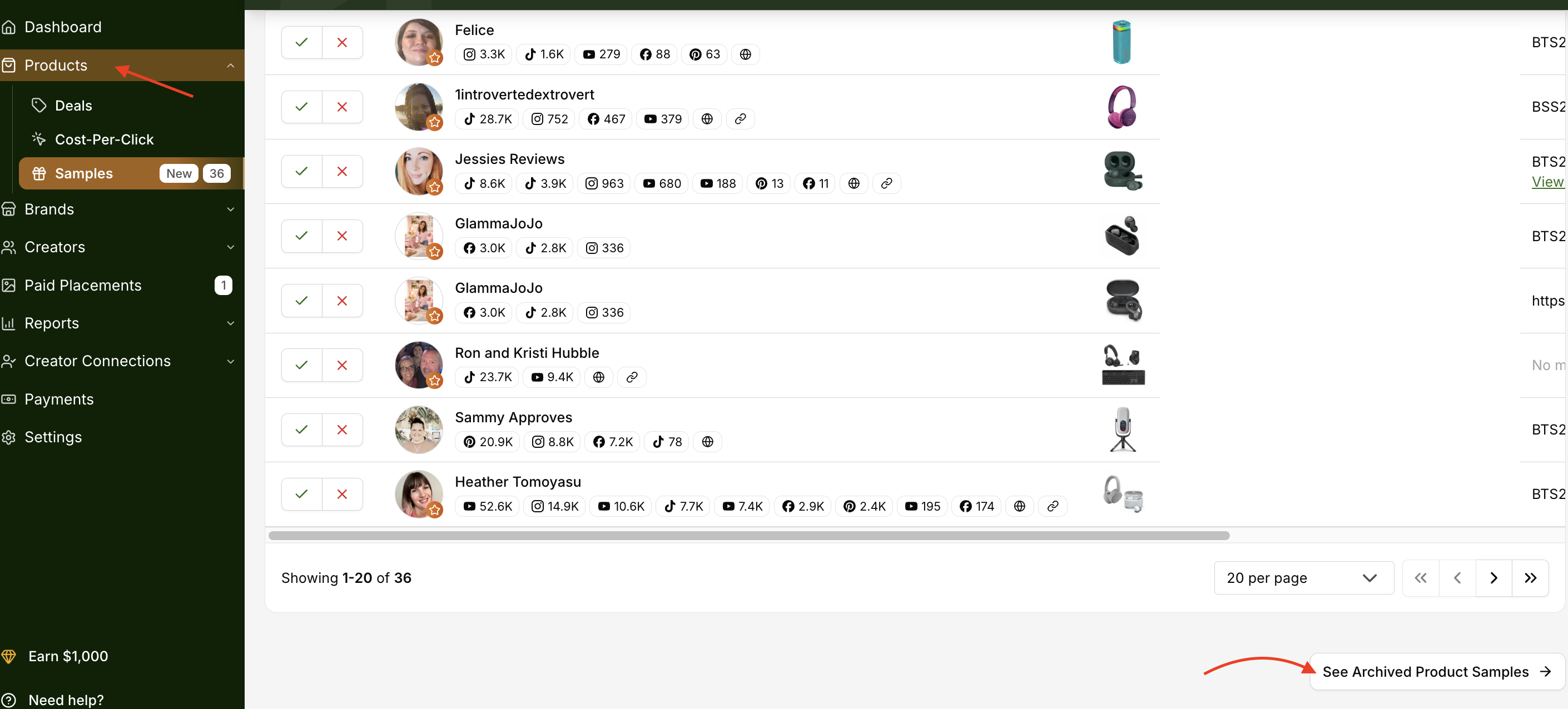
Archived Product Samples- Any sample request or record that remains unaddressed for 14 days is automatically archived by the system, regardless of status (incoming, accepted, rejected, or pending)
Sampling Suites- A Sampling Suite is a curated list of your products that you send to a creator, letting them pick the item they want instead of you picking for them. You build the suite once, then send it to as many creators as you like.

How It Works
Creators request samples from your listed products.
You can review and approve or reject requests directly in the Samples tab, under Incoming.

If you accept a request, a pop-up will appear with a note indicating whether the creator has not yet driven any sales. You have full discretion to decide whether to proceed with the sample request.
Once approved, Levanta’s Amazon integration automatically ships and tracks the order—no manual shipping required.
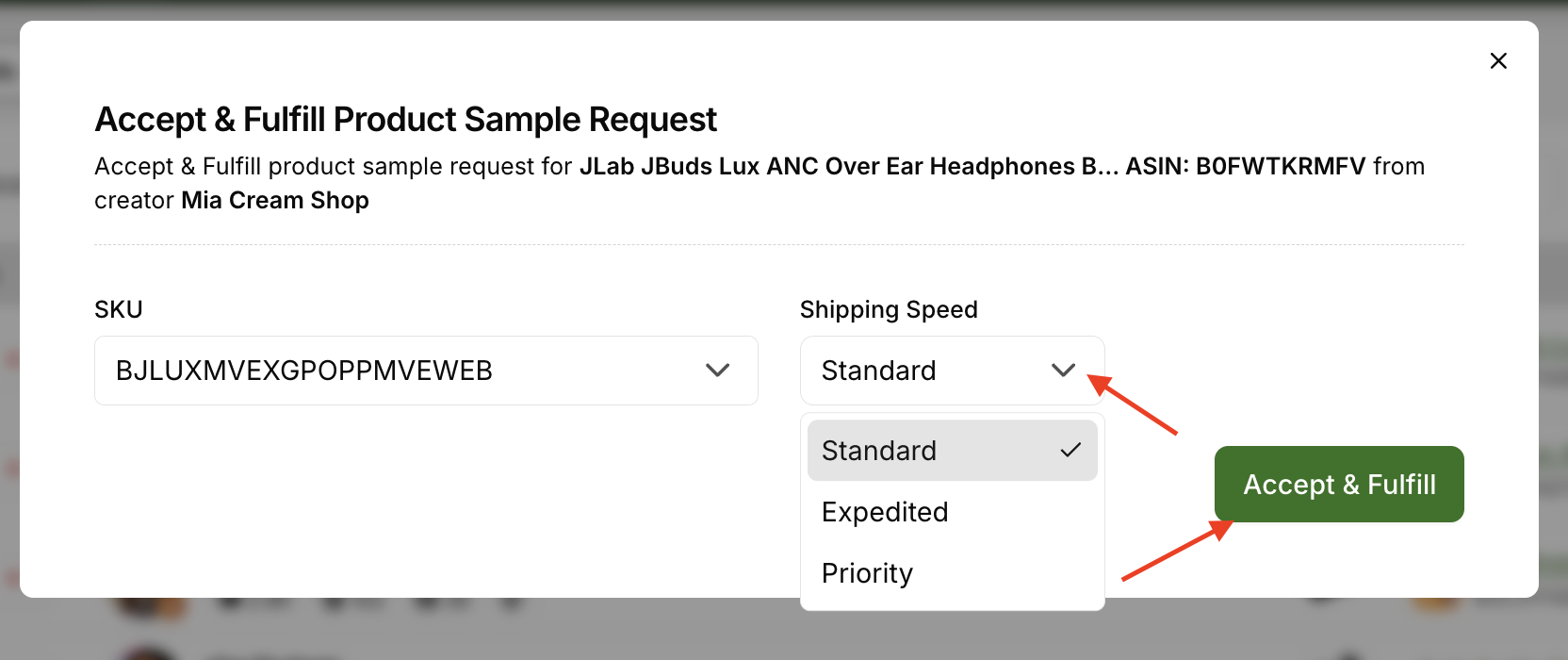
Once approved, Levanta’s Amazon integration automatically ships and tracks the order—no manual shipping required.
Why Use Product Samples?
Streamline fulfillment: Ship in clicks, not emails.
Start collaborations: Easy way to connect with new creators.
Enable authentic content: Creators promote with first-hand experience.
Track everything: Monitor requests and shipments in your dashboard
How Product Samples Are Fulfilled & Reported (Amazon)
When a product sample is sent using Levanta’s Product Sampling feature, the order is processed through Amazon as a Multi-Channel Fulfillment (MCF) order.
What this means:
Brands are billed per sample unit sent
All standard FBA MCF fees apply, just like any other MCF order
Fulfillment is handled entirely by Amazon, using your existing FBA inventory
Reporting & Tracking Samples (Amazon)
Because samples are fulfilled as MCF orders, they do not appear in standard Amazon Business Reports alongside regular sales. Instead, they are reflected in MCF order reports, which can be pulled separately from Amazon.
Brands that send a higher volume of samples typically:
Track samples internally (e.g., spreadsheets or internal dashboards)
Use Levanta to view which creators and products were approved and sampled
Cross-reference that data with Amazon’s MCF reports to maintain accurate records
While Amazon does not label these orders as “samples” in native reporting, tracking remains straightforward when combining Levanta reporting with internal documentation.
Creator Request Limits
To keep sample requests focused and manageable, creators are subject to Sample request limits that are based on their creator tiers.
These limits help ensure that you receive only high-intent requests, giving you greater control over which samples you fulfill.
How Creators Can Update Their Product Sample Address
Creators can update their shipping address for product samples directly within Levanta.
Steps to Update:
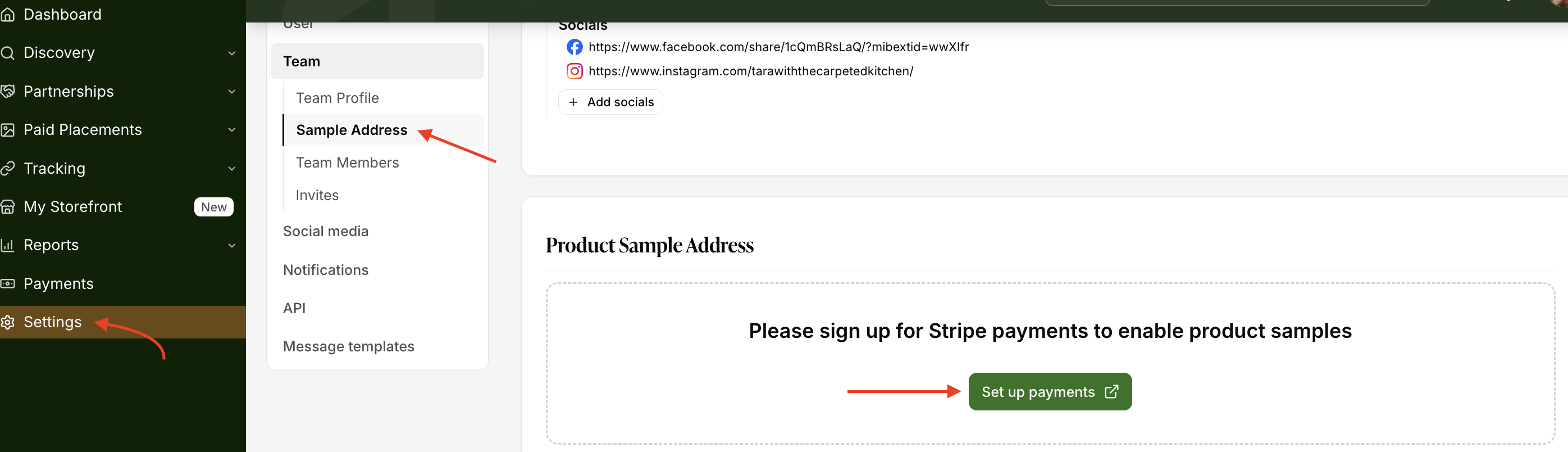
Go to Settings > Team.
Navigate to Product Sample Address.
Click Update Address and enter your correct shipping details.
Save your changes.
⚠ Important Note: Stripe must be set up before updating your shipping address.
Archiving Rules
A sample request must be accepted by the creator before it becomes a fulfillment order
Requests older than 14 days automatically archive if left pending.
Archived requests cannot be accepted.
To view archived items:
Go to Products → Samples → See Archived Product Samples
Questions or Need Help? Our team is here to support you! Reach out to your dedicated CSM or email us at cs@levanta.io